census geography

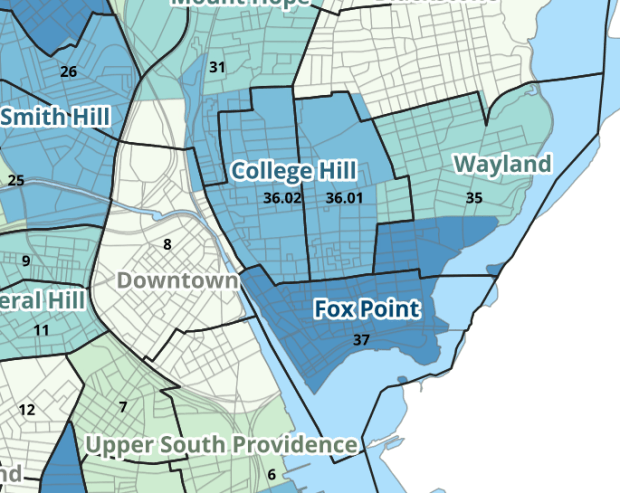
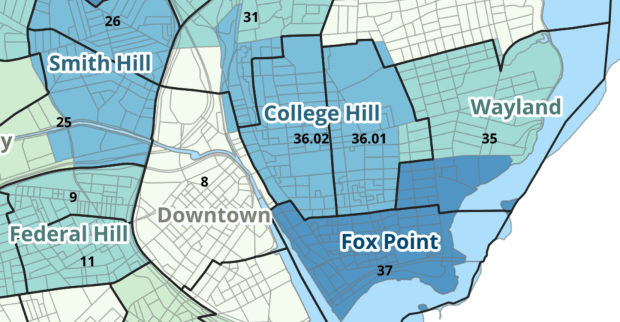
Providence Census Geography Map

Crosswalking Census Data to Neighborhood Geographies

Last semester we completed a project to create a crosswalk between census geographies and local geographies in Providence, RI. Crosswalks are used for relating two disparate sets of geography, so that you can compile data that’s published for one set of geography in another. Many cities have locally-defined jurisdictions like wards or community districts, as well as informally defined areas like neighborhoods. When you’re working with US Census data, you use small statistical areas that the Bureau defines and publishes data for; blocks, block groups, census tracts, and perhaps ZCTAs and PUMAs. A crosswalk allows you to apportion data that’s published for census areas, to create estimates for local areas (there are also crosswalks that are used for relating census geography that changes over time, such as the IPUMS crosswalks).

How the Crosswalk Works

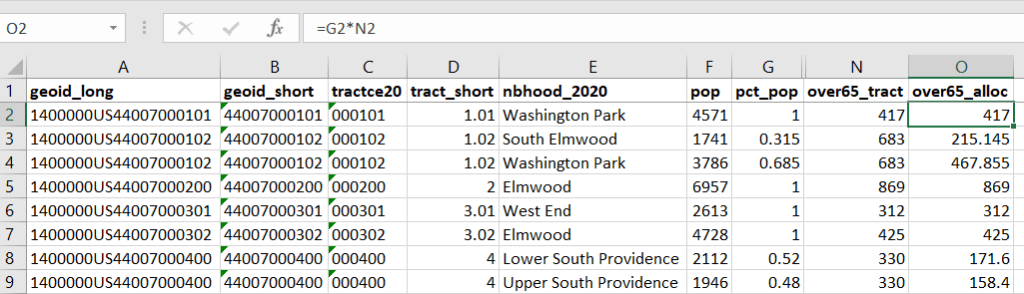
For example, in the Providence Census Geography Crosswalk we have two crosswalks that allow you to take census tract data, and convert it to either neighborhoods or wards. I’ll refer to the neighborhoods in this post. In the crosswalk table, there is one record for each portion of a tract that overlaps a neighborhood. For each record, there are attribute columns that indicate the count and the percentage of a tract’s population, housing units, land area, and total area that fall within a given neighborhood. If a tract appears just once in the table, that means it is located entirely within one neighborhood. In the image below, we see that tract 1.01 appears in the table once, and its population percentage is 1. That means that it falls entirely within the Washington Park neighborhood, and 100% of its population is in that neighborhood. In contrast, tract 1.02 appears in the table twice, which means it’s split between two neighborhoods. Its pct_pop column indicates that 31.5% of its population is in South Elmwood, while 68.5% is in Washington Park. The population count represents the number of people from that tract that are in that neighborhood.

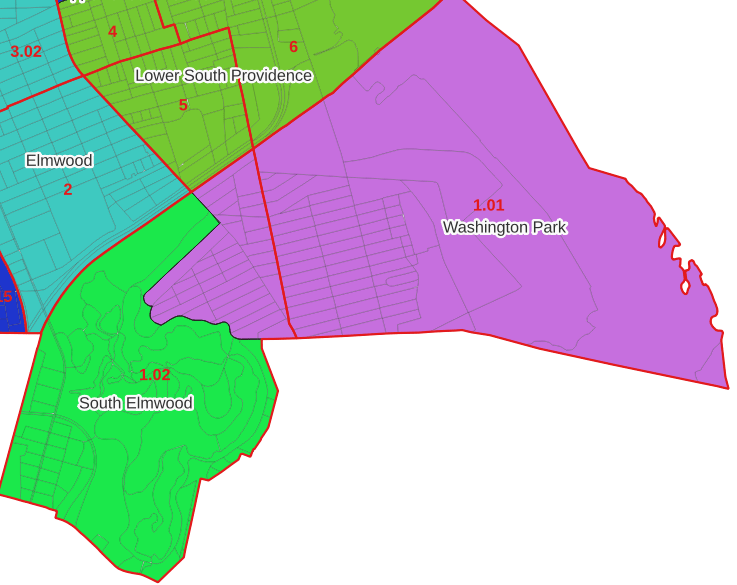
Looking at the map below, we can see that census tract 1.01 falls entirely within Washington Park, and tract 1.02 is split between Washington Park and South Elmwood. To generate estimates for Washington Park, we would sum data for tract 1.01 and the portion of tract 1.02 that falls within it. Estimates for South Elmwood would be based solely on the portion of tract 1.02 that falls within it. With the crosswalk, “portion” can be defined as the percentage of the tract’s population, housing units, land area, or total area that falls within a neighborhood.

The primary purpose of the crosswalk is to generate census data estimates for neighborhoods. You apportion tract data to neighborhoods using an allocation factor (population, housing units, or area) and aggregate the result. For example, if we have a census tract table from the 2020 census with the population that’s 65 years and older, we can use the crosswalk to generate neighborhood-level estimates of the 65+ population. To do that, we would:

  1. Join the data table to the crosswalk using the tract’s unique ID; the crosswalk has both the long and short form of the GEOIDs used by the Census Bureau. So for each crosswalk record, we would associate the 65+ population for the entire tract with it.
  2. Multiply the 65+ population by one of the allocation columns – the percent population in this example. This would give us an estimate of the 65+ population that live in that tract / neighborhood piece.
  3. Group or aggregate this product by the neighborhood name, to obtain a neighborhood-level table of the 65+ population.
  4. Round decimals to whole numbers.

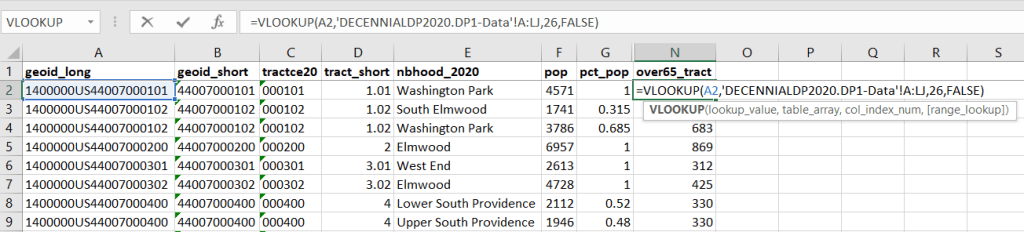
To do the calculations in a spreadsheet, you would import the appropriate crosswalk sheet into the workbook that contains the census data that you want to apportion, so that they appear as separate sheets in the same workbook. In the crosswalk worksheet, use the VLOOKUP formula and reference the GEOID to “join” the census tract data to the crosswalk. The formula requires: cell containing the ID value you wish to look up, the range of cells in a worksheet that you will search through, the number of the column that contains the value you wish to retrieve (column A is 1, Z is 26, etc.), and the parameter “FALSE” to get an exact match. It is assumed that the look up value in the target table (the matching ID) appears in the first column (A).

The tract data is now repeated for each tract / neighborhood segment. Next, use formulas to multiply the allocation percentage (pct_pop in this example) by the census data value (over 65 pop for the entire tract) to create an allocated estimate for each tract / neighborhood piece.

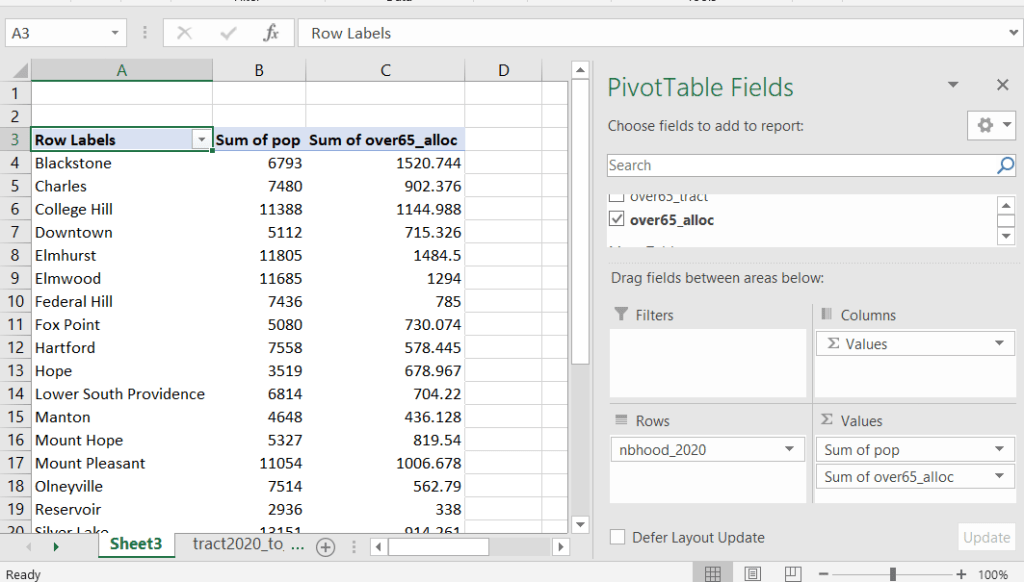
Then you can generate a pivot table (on the Insert ribbon in Excel) where you group and sum that allocated result by neighborhood (neighborhoods as rows, census data as summed values in columns). Final step is to round the estimates.

This process is okay for small projects where you have a few estimates you want to quickly tabulate, but it doesn’t scale well. I’d use a relational database instead; import the crosswalk and census data table into SQLite, where you can easily do a left join, calculated field, and then a group by statement. Or, use the joining / calculating / aggregating equivalents in Python or R.

I used the percentage of population as the allocation factor in this example. If the census data you’re apportioning pertains to housing units, you could use the housing units percentage instead. In any case, there is an implicit assumption that the data you are apportioning has the same distribution as the allocation factor. In reality this may not be true; the distribution of children, seniors, homeowners, people in poverty etc. may vary from the total population’s distribution. It’s important to bear in mind that you’re creating an estimate. If you are apportioning American Community Survey data this process gets more complicated, as the ACS statistics are fuzzy estimates. You’d also need to apportion the margin of error (MOE) and create a new MOE for the neighborhood-level estimates.

The Providence crosswalk has some additional sheets that allow you to go from tracts, ZCTAs, or blocks to neighborhoods or wards. The tract crosswalk is by far the most useful. The ZCTA crosswalk was an exercise in futility; I created it to demonstrate the complete lack of correlation between ZCTAs and the other geographies, and recommend against using it (we also produced a series of maps to visually demonstrate the relationship between all the geographies). There is a limited amount of data published at the block level, but I included it in the crosswalk for another reason…

Creating the Crosswalk

I used census blocks to create the crosswalk. They are the smallest unit of census geography, and nest within all other census geographies. I used GIS to assign each block to a neighborhood or ward based on the geography the block fell within, and then aggregated the blocks into distinct tract / ward and tract / neighborhood combinations. Then I calculated the allocation factors, the percentage of the tract’s total attributes that fell in a particular neighborhood or ward. This operation was straightforward for the wards; the city constructed them using 2020 census blocks, so the blocks nested or fit perfectly within the wards.

The neighborhoods were more complicated, as these were older boundaries that didn’t correspond to the 2020 blocks, and there were many instances where blocks were split between neighborhoods. My approach was to create a new set of neighborhood boundaries based on the 2020 blocks, and then use those new boundaries to create the crosswalk. I began with a spatial join, assigning each block a neighborhood ID based on where the center of the block fell. Then, I manually inspected the borders between each neighborhood, to determine whether I should manually re-assign a block. In almost all instances, blocks I reassigned were unpopulated and consisted of slivers that contained large highways, or blocks of greenspace or water. I struck a balance between remaining as faithful to the original boundaries as possible, while avoiding the separation of unpopulated blocks from a tract IF the rest of the blocks in that tract fell entirely within one neighborhood. In two cases where I had to assign a populated block, I used satellite imagery to determine that the population of the block lived entirely on one side of a neighborhood boundary, and made the assignment accordingly.

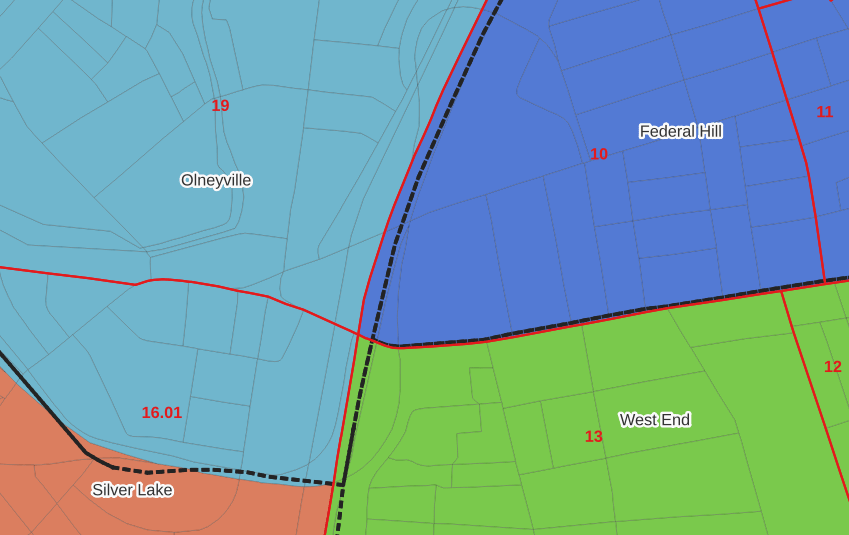
In the example below, 2020 tract boundaries are shown in red, 2020 block boundaries are light grey, original neighborhood boundaries are shown with dotted black lines, and reconstituted neighborhoods using 2020 blocks are shown in different colors. The boundaries of Federal Hill and the West End are shifted west, to incorporate thin unpopulated blocks that contain expressways. These empty blocks are part of tracts (10 and 13) that fall entirely within these neighborhoods; so splitting them off to adjacent Olneyville and Silver Lake didn’t make sense (as there would be no population or homes to apportion). Reassigning them doesn’t change the fact that the true boundary between these neighborhoods is still the expressway. We also see an example between Olneyville and Silver Lake where the old neighborhood boundary was just poorly aligned, and in this case blocks are assigned based on where the center of the block fell.

Creating the crosswalk from the ground up with blocks was the best approach for accounting how population is distributed within larger areas. It was primarily an aggregation-based approach, where I could sum blocks that fell within geographies. This approach allowed me to generate allocation factors for population and housing units, since this data was published with the blocks and could be carried along.

Conversely, in GIS 101 you would learn how to calculate the percentage of an area that falls within another area. You could use that approach to create a tract-level crosswalk based on area, i.e. if a tract’s area is split 50/50 between two neighborhoods, we’ll apportion its population 50/50. While this top down approach is simpler to implement, it’s far less ideal because you often can’t assume that population and area are equally distributed. Reconsider the example we began with: 31.5% of tract 1.02’s population is in South Elmwood, while 68.5% is in Washington Park. In contrast, 75.3% of tract 1.02’s land area is in South Elmwood, versus only 24.7% in Washington Park! If we apportioned our census data by area instead of population, we’d get a dramatically different, and less accurate, result. Roger Williams Park is primarily located in the portion of tract 1.02 that falls within Elmwood; it covers a lot of land but includes zero people.

Why can’t we just simply aggregate block-level census data to neighborhoods and skip the whole apportionment step? The answer is that there isn’t much data published at the block level. There’s a small set of tables that capture basic demographic variables as part of the decennial census, and that’s it. There was a sharp reduction in the number of block-level tables in the 2020 census due to new privacy regulations, and the ACS isn’t published at the block-level at all. While you can use the block-level table in the crosswalk to join and aggregate block data, in most cases you’ll need to work with tract-data and apportion it.

I used spatial SQL to create the crosswalks in Spatialite and QGIS , and if you’re interested in seeing all the gory details you can look at the code and spatial database in source folder of the project’s GitHub repo. I always prefer SQL for spatial join and aggregation operations, as I can write a single block of code instead of running 4 or 5 different of desktop GIS tools in a sequence. I’ll be updating the project this semester to include additional geographies (block groups – the level between blocks and tracts), and perhaps an introductory tutorial for using it (there are some basic docs at present).

Map Vacant Housing Units

Census Time Series Tables from NHGIS

I’m often asked about what the best approaches are for comparing US census data over time, to account for changes in census geography and to limit the amount of data processing you have to do in stitching data from different census years together. Census geography changes significantly each decade, and by and large the Census Bureau does not compile and publish historical comparison tables.

My primary suggestion is to use the National Historical Geographic Information System or NHGIS (I’ll mention some additional suggestions at the end of this post). Maintained by IPUMS at the University of Minnesota, NHGIS is the repository for all historic US census summary data from 1790 to present. While most of the data in the archive is published nominally (the format and structure in which the data was originally published), they do publish a set of Time Series Tables that compile multiple years of census data in one table. These tables come in two formats:

  • Nominal tables: the data is published “as is”, based on the boundaries that existed at each point in time. If a geography was added or dropped over the course of the years, it falls in or out of the table in the given year that the change occurred. With a few exceptions, the earliest nominal tables begin with the 1970 census and are published for eight geographies: nation, regions, divisions, states, counties, census tracts, county subdivisions, and places.
  • Standardized tables: the data has been normalized, where a geography for a single time period serves as the basis for all data in the table. The NHGIS is currently using 2010 as the basis, so that data prior and subsequent to 2010 has been modified to fit within the 2010 boundaries. This is achieved by aggregating block or block group data from each period to fit within the 2010 boundaries, and apportioning the data in cases where a block or group is split by a boundary. The earliest standardized tables begin with the 1990 census, and cover the basic 100% count data. Data is published for ten geographies: states, counties, census tracts, block groups, county subdivisions, places, congressional districts (as defined for the 110th-112th Congresses, 2007-2013), core based statistical areas (using 2009 metro area definitions), urban areas, and ZIP Code Tabulation Areas (ZCTAs).

Included in the documentation is a full list of time series tables, and whether they are available in nominal or standardized format. The availability of specific time periods and geographies varies. As of late 2024, the availability of standardized tables that include the 2020 census is currently limited to what was published in the early Public Redistricting Files. This will likely change in the near future to include additional 2020 data, and it’s possible that the standardized geography will eventually switch from 2010 to 2020 geography.

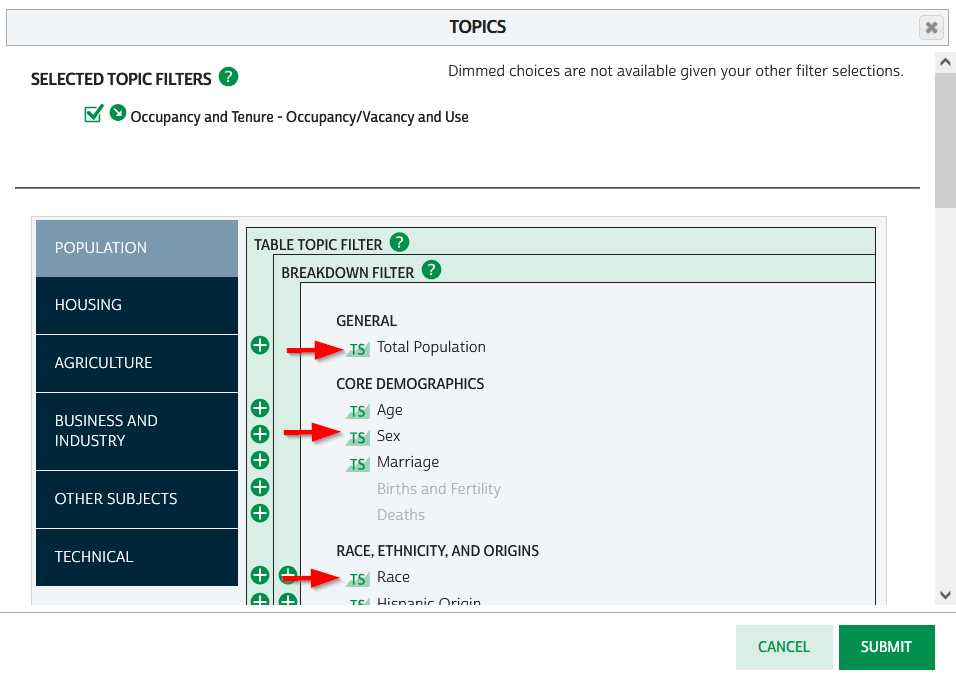
To access the Time Series Tables, you can browse the NHGIS without an account but you’ll need to create one in order to download anything. Once you launch NHGIS click on the Topics filter. In the list of topics, any topic under the Population or Housing category that has a “TS” flag next to it has at least one time series table. In the example below, I’ve used the filters to select census tracts for Geographic Level, 2010 and 2020 for Years, and HousingOccupancy and Vacancy status as my Topic.

NHGIS Time Series flags in topics filter

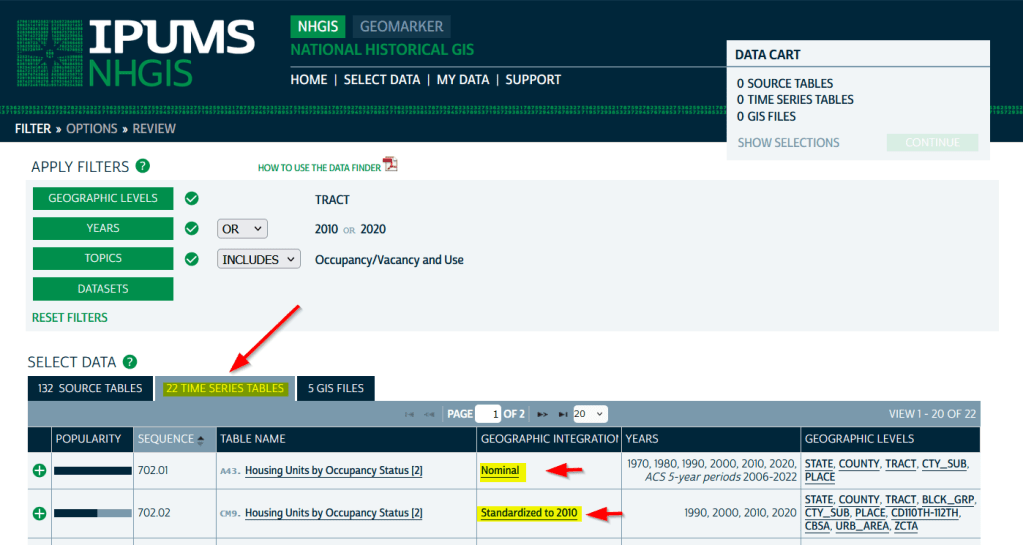
In the results at the bottom, the original Source Tables from each census are shown in the first tab. The Time Series Tables can be viewed by selecting the adjacent tab. The first two tables in this example are Housing Units by Occupancy Status. Clicking on the name of the tables reveals the variables that are included, and the source for the statistics. The first table is a nominal one that stretches from 1970 to the most recent ACS. The second table is a standardized one that covers 1990 to 2020. I’ve checked both boxes to add these to my cart.

NHGIS Select Time Series Tables

The third tab in the results are GIS Files. If we want to map standardized data, we would choose just the boundaries for the standardized year, as all of the data in the table has been modified to fit these boundaries. If we were mapping nominal data, we would need to download boundary files for each time period and map them separately (unless they were stable geographies like states that haven’t changed since 1970).

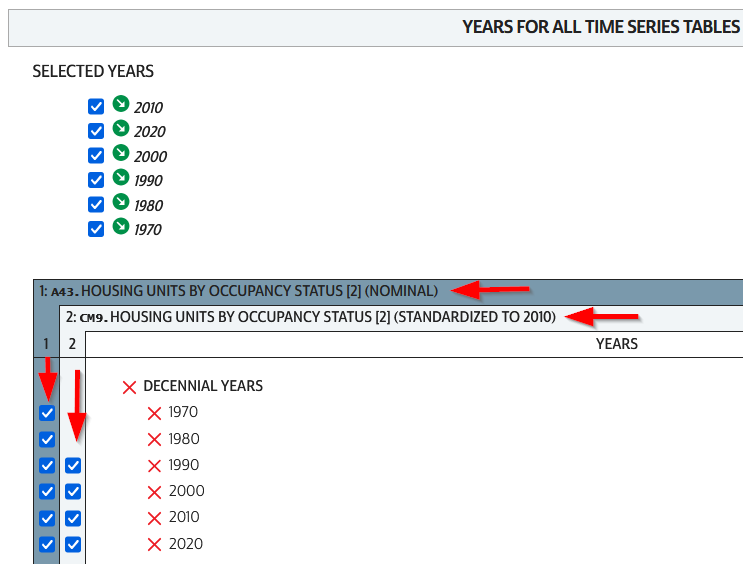
We hit the Continue button in the Cart panel when we’re ready to download. By default the extract will only include years and geographies we have filtered for. To add additional years or geos we can add them on this next screen. I’ve modified my list to get all available decennial years for each table. Note that if you’re going to select 5-year ACS data for nominal tables, choose only a few non-overlapping periods. In most cases you can’t filter geographies (i.e. select tracts within a state), you have to take them all. On the final screen you choose your structure; CSV is usually best, as is Time varies by column. Once you submit your request you’ll be prompted to log in if you haven’t already done so. Wait a bit for the extract to compile, then you can download the table and codebook.

NHGIS Select Years for Time Series

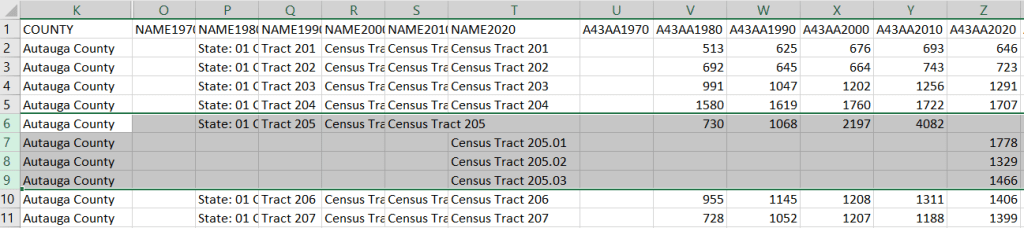
A portion of the nominal table is depicted below. This table includes identifiers and labels for each of the census years. The variables follow, ordered by variable and then by year. In this example, occupied housing units from 1970 to 2020 appear in the first block, and vacant units in the second. All the 1970 census tract values for Autauga County, Alabama are blank (as many rural counties in 1970 were un-tracted). We can see that values for census tract 205 run only from 1980 to 2010, with no value for 2020. The tract was split into three parts in 2020, and we see values for tracts 205.01, .02, and .03 appear in 2020. So in the nominal tables, geographies appear and disappear as they are created or destroyed. However, if geographic boundaries change but the name and designation for the geography do not, that geography persists throughout the time series in spite of the change.

Nominal tract table

A portion of the standardized table is below. This table only includes identifiers and labels for the 2010 census, as all data was modified to fit the tract geography of that year. The values for each census year except 2010 are published in triplicate: an estimate, and a lower and upper bound for the estimate. If the values in these three columns differ, it indicates that a block (or block group) was split and reapportioned to fit within the tract boundary for 2010 (you may also see decimals, indicating a split occurred). You’d use the estimate in your work, while the bounds provide some indication of the estimate’s accuracy. Note in this table, tract 205 in Autauga County persists from 1990 to 2020, as it existed in 2010. Data from the three 2020 tracts was aggregated to fit the 2010 boundary.

Standardized tract table

The crosswalk tables that IPUMS used to create the standardized data are available, if you wanted or needed to generate your own normalized data. The best approach is to proceed from the bottom up, aggregating blocks to reformulate the data to the geography you wish to use. Some decennial census data, and all data from the ACS, is not available at the block level, which necessitates using block groups instead.

There are some alternatives for obtaining or creating time series census data, which could fit the bill depending on your use case (esp if you are looking at larger geographies). There’s also reference material that can help you make sense of changes.

  1. The Longitudinal Tract Database at Brown University provides tract-level crosswalks from 1970 to 2020. They also provide some pre-compiled data tables generated from the crosswalk.
  2. For short term comparisons, the ACS includes Comparison Profile Tables for states, counties, places, and metro areas that compare two non-overlapping time periods. For example, here is the 5-year ACS Comparative Demographic Estimates profile for Providence RI in 2022 (compares 2018-2022 with 2013-2017).
  3. Use an interactive mapping tool like the Social Explorer to make side by side comparison maps from two time periods. They also incorporate some of the NHGIS standardized data into their database. (SE is a subscription-based product; if you’re at a university see if your library subscribes).
  4. The Population and Housing Unit Estimates program publishes annual estimates for states, counties, and metro areas in decade by decade spreadsheets. The MCDC has created some easy to use tools for summarizing and charting this data to show annual population change and changes in demographic characteristics.
  5. I had previously written about pulling population and economic time series tables for states, counties, and metro areas from the Bureau of Economic Analysis data portal.
  6. Counties change more often than you think. The Census Bureau has a running list of changes to counties from 1970 to present. Metro areas change frequently too, but since they are built from counties you can aggregate older county data to fit modern metro boundaries. The census provides delineation files that assign counties to metros.

2020 Census Demographic Profile

2020 Census Data Wrap-up

Right before the semester began, I updated the Rhode Island maps on my census research guide so that they link to the recently released Demographic Profile tables from the 2020 Census. I feel like the release of the 2020 census has flown lower on the radar compared to 2010 – it hasn’t made it into the news or social media feeds to the same degree. It has been released much later than usual for a variety of reasons, including the COVID pandemic and political upheaval and shenanigans. At this point in Sept 2023, most of what we can expect has been released, and is available via data.census.gov and the census APIs.

Here are the different series, and what they include.

  • Apportionment data. Released in Apr 2021. Just the total population counts for each state, used to reapportion seats in Congress.
  • Redistricting data. Released in Aug 2021. Also known as PL 91-171 (for the law that requires it), this data is intended for redrawing congressional and legislative districts. It includes just six tables, available for several geographies down to the block level. This was our first detailed glimpse of the count. The dataset contains population counts by race, Hispanic and Latino ethnicity, the 18 and over population, group quarters, and housing unit occupancy. Here are the six US-level tables.
  • Demographic and Housing Characteristics File. Released in May 2023. In the past, this series was called Summary File 1. It is the “primary” decennial census dataset that most people will use, and contains the full range of summary data tables for the 2020 census for practically all census geographies. There are fewer tables overall relative to the 2010 census, and fewer that provide a geographically granular level of detail (ostensibly due to privacy and cost concerns). The Data Table Guide is an Excel spreadsheet that lists every table and the variables they include.
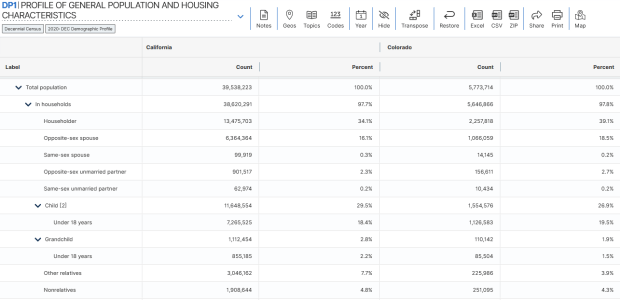
  • Demographic Profile. Released in May 2023. This is a single table, DP1, that provides a broad cross-section of the variables included in the 2020 census. If you want a summary overview, this is the table you’ll consult. It’s an easily accessible option for folks who don’t want or need to compile data from several tables in the DHC. Here is the state-level table for all 50 states plus.
  • Detailed Demographic and Housing Characteristics File A. Released in Sept 2023. In the past, this series was called Summary File 2. It is a subset of the data collected in the DHC that includes more detailed cross-tabulations for race and ethnicity categories, down to the census tract level. It is primarily used by researchers who are specifically studying race, and the multiracial population.
  • Detailed Demographic and Housing Characteristics File B. Not released yet. This will be a subset of the data collected in the DHC that includes more detailed cross-tabulations on household relationships and tenure, down to the census tract level. Primarily of interest to researchers studying these characteristics.

There are a few aspects of the 2020 census data that vary from the past – I’ll link to some NPR stories that provide a good overview. Respondents were able to identify their race or ethnicity at a more granular level. In addition to checking the standard OMB race category boxes, respondents could write in additional details, which the Census Bureau standardized against a list of races, ethnicities, and national origins. This is particularly noteworthy for the Black and White populations, for whom this had not been an option in the recent past. It’s now easier to identify subgroups within these groups, such as Africans and Afro-Caribbeans within the Black population, and Middle Eastern and North Africans (MENA) within the White population. Another major change is that same-sex marriages and partnerships are now explicitly tabulated. In the past, same-sex marriages were all counted as unmarried partners, and instead of having clearly identifiable variables for same-sex partners, researchers had to impute this population from other variables.

Another major change was the implementation of the differential privacy mechanism, which is a complex statistical process to inject noise into the summary data to prevent someone from reverse engineering it to reveal information about individual people (in violation of laws to protect census respondent’s privacy). The social science community has been critical of the application of this procedure, and IPUMS has published research to study possible impacts. One big takeaway is that published block-level population data is less reliable than in the past (housing unit data on the other hand is not impacted, as it is not subjected to the mechanism).

When would you use decennial census data versus other census data? A few considerations – when you:

  • Want or need to work with actual counts rather than estimates
  • Only need basic demographic and housing characteristics
  • Need data that provides detailed cross-tabulations of race, which is not available elsewhere
  • Need a detailed breakdown of the group quarters population, which is not available elsewhere
  • Are explicitly working with voting and redistricting
  • Are making historical comparisons relative to previous 10-year censuses

In contrast, if you’re looking for detailed socio-economic characteristics of the population, you would need to look elsewhere as the decennial census does not collect this information. The annual American Community Survey or monthly Current Population Survey would be likely alternatives. If you need basic, annual population estimates or are studying the components of population change, the Population and Housing Unit Estimates Program is your best bet.

IPUMS CPS Table

Creating Geographic Estimates with the IPUMS CPS Online Data Analysis System

Introduction

In this post I’ll demonstrate how to use the IPUMS CPS Online Data Analysis System to generate summary data from the US Census Bureau’s Current Population Survey (CPS). The tool employs the Survey Documentation and Analysis system (SDA) created at UC Berkeley.

The CPS is a monthly stratified sample survey of 60k households. It includes a wide array of statistics, some captured routinely each month, others at various intervals (such as voter registration and participation, captured every November in even-numbered years). The same households are interviewed over a four-month period, then rotated out for four months, then rotated back in for a final four months. Given its consistency, breadth, high response rate and accuracy (interviews are conducted in-person and over the phone), researchers use the CPS microdata (individual responses to surveys that have been de-identified) to study demographic and socio-economic trends among and between different population groups. It captures many of the same variables as the American Community Survey, but includes a fair number that are not.

I think the CPS is used less often by geographers, as the sample size is too small to produce reliable estimates below the state or metropolitan area levels. I find that students and researchers who are only familiar with working with summary data often don’t use it; generating your own estimates from microdata records can be time consuming.

The IPUMS project provides an online analyzer that lets you generate summary estimates from the CPS without having to handle the individual sample records. I’ve used it in undergraduate courses where students want to generate extracts of data at the regional or state level, and who are interested in variables not collected in the ACS, such as generational households for immigrants. The online analyzer doesn’t include the full CPS, but only the data that’s collected in March as part of the core CPS series, and the Annual Social & Economic Supplement (ASEC). It includes data from 1962 to the present.

To access any of the IPUMS tools, you must register and create an account, but it’s free and non-commercial. They provide an ample amount of documentation; I’ll give you the highlights for generating a basic geographic-based extract in this post.

Creating a Basic Geographic Summary Table

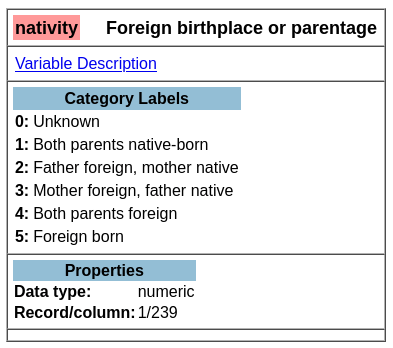
Once you launch the tool, the first thing you need to do is select some variables. You can use the drill-down folder menus at the bottom left, but I find it’s easier to hit the Codebook button and peruse the alphabetical list. Let’s say we want to generate state-level estimates for nativity for a recent year. If we go into the codebook and look-up nativity, we see it captures foreign birthplace or parentage. Also in the list is a variable called statefip, which are the two-digit codes that uniquely identify every state.

Codebook for Nativity – Foreign Birthplace or Parentage

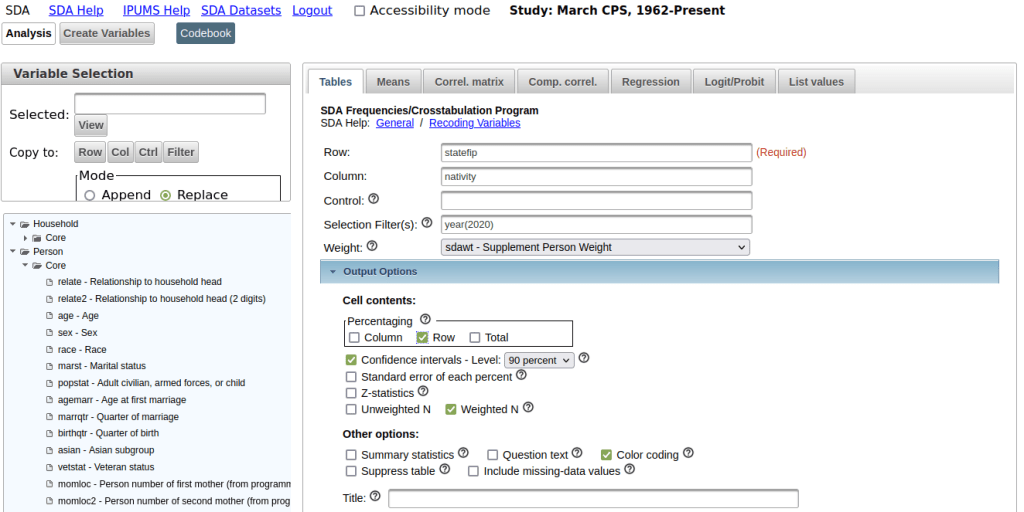
Back on the main page for the Analyzer in the tables tab, we provide the following inputs:

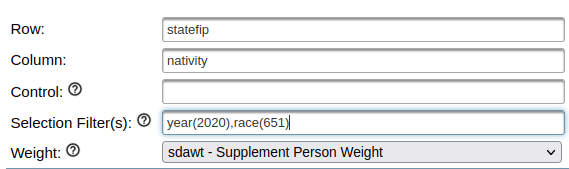
  1. Row represents our records or observations. We want a record for every state, so we enter the variable: statefip.
  2. Column represents our attributes or variables. In this example, it’s: nativity.
  3. Selection filter is used to specify that we want to generate estimates from a subset of all the responses. To generate estimates for the most recent year, we enter year as the variable and specify the filter value in parentheses: year(2020). If we didn’t specify a year, the program would use all the responses back to 1962 to generate the estimates.
  4. Weight is the value that’s used to weight the samples to generate the estimates. The supplemental person weight sdawt is what we’ll use, as nativity is measured for individual persons. There is a separate weight for household-level variables.
  5. Under the output option dropdown, we change the Percentaging option from column to row. Row calculates the percentage of the population in each nativity category within the state (row). The column option would provide the percentage of the population in each nativity category between the states. In this example, the row option makes more sense.
  6. For the confidence interval, check the box to display it, as this will help us gauge the precision of the estimate. The default level is 95%; I often change this to 90% as that’s what the American Community Survey uses.
  7. At the bottom of the screen, run the table to see the result.
CPS Online Analyzer – Generate Basic Extract for Nativity by State for a Single Year

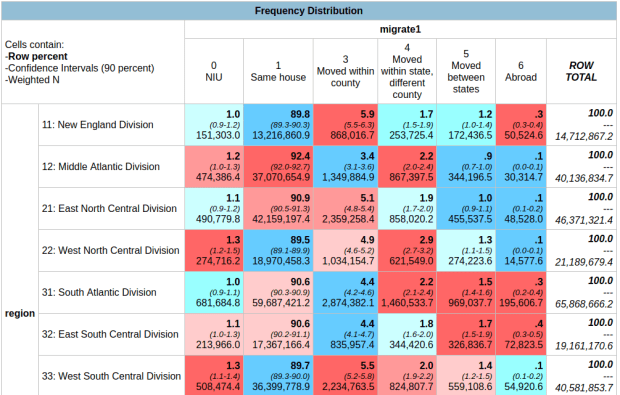
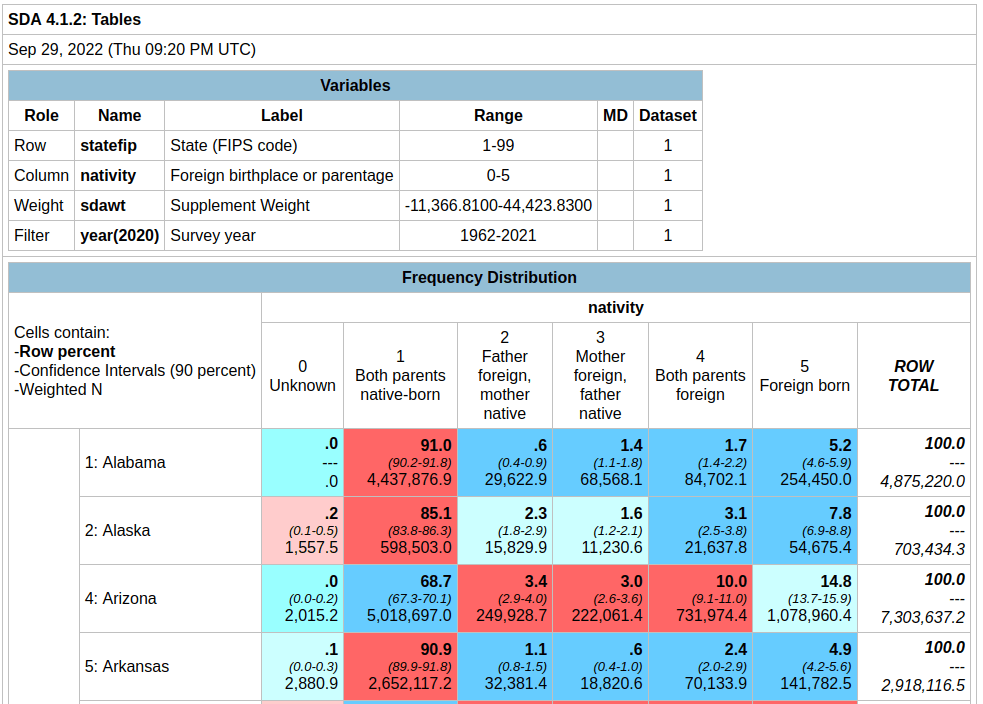
In the result, the summary of your parameters appears at the top, with the table underneath. At the top of the table, the Cells contain legend lists what appears in each of the cells in order. In this example, the row percent is first, in bold. For the first cell in Alabama: 91.0% of the total population have parents who were both born in the US, the confidence interval is 90.2% to 91.8% (and we’re 90% confident that the true value falls within this range), and the large number at the bottom is the estimated number of cases that fall in this category. Since we filtered our observations for one year, this represents the total population in that category for that year (if we check the totals in the last column against published census data, they are roughly equivalent to the total population of each state).

Output Table – Nativity by State in 2020

Glancing through the table, we see that Alabama and Alaska have more cases where both parents are born in the US (91.0% and 85.1%) relative to Arizona (68.7%). Arizona has a higher percentage of cases where both parents are foreign born, or the persons themselves are foreign-born. The color coding indicates the Z value (see bottom of the table for legend), which indicates how far a variable deviates from the mean, with dark red being higher than the expected mean and dark blue being lower than expected. Not surprisingly, states with fewer immigrants have higher than average values for both parents native born (Alabama, Alaska, Arkansas) while this value is lower than average for more diverse states (Arizona, California).

To capture the table, you could highlight / copy and paste the screen from the website into a spreadsheet. Or, if you return to the previous tab, at the bottom of the screen before running the table, you can choose the option to export to CSV.

Variations for Creating Detailed Crosstabs

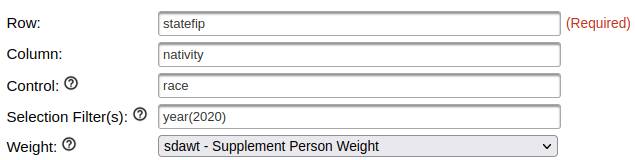
To generate a table to show nativity for all races:

Input Parameters – Generate Tables for Nativity by State for each Race

In the control box, type the variable race. The control box will generate separate tables in the results for each category in the control variable. In this case, one nativity table per racial group.

To generate a table for nativity specifically Asians:

Input Parameters – Generate Table for Nativity by State for Asians

Remove race from the control box, and add it in the filter box after the year. In parentheses, enter the race code for Asians; you can find this in the codebook for race: year(2020), race(651).

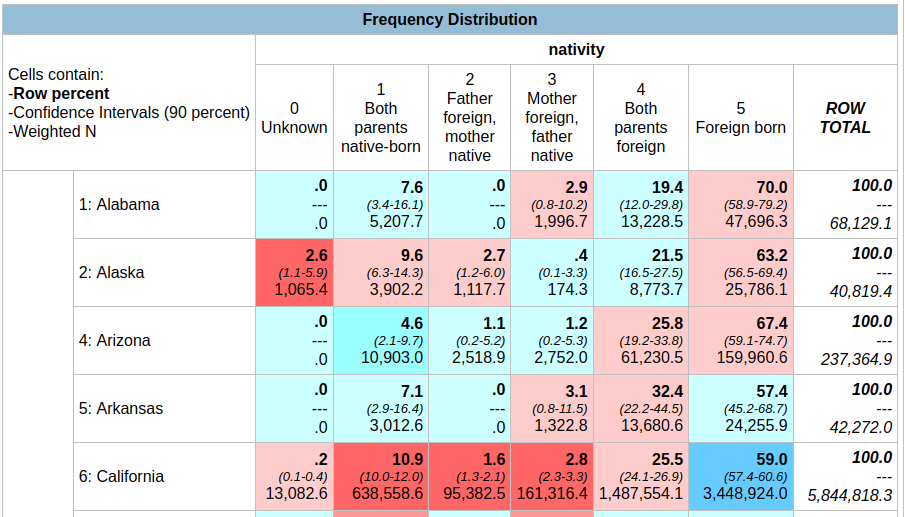
Now that we’re drilling down to smaller populations, the reliability of the estimates is declining. For example, in Arkansas the estimate for Asians for both parents foreign born is 32.4%, but the value could be as low as 22.2% or as high as 44.5%. The confidence interval for California is much narrower, as the Asian population is much larger there. How can we get a better estimate?

Output Table – Nativity by State for Asians in 2020

Generate a table for nativity for Asians over a five year period:

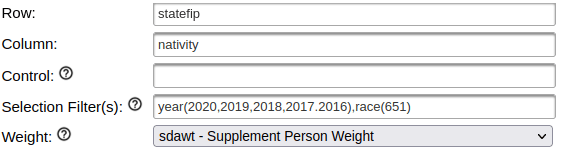
Input Parameters – Generate Table for Nativity by State for Asians for 5-year Period

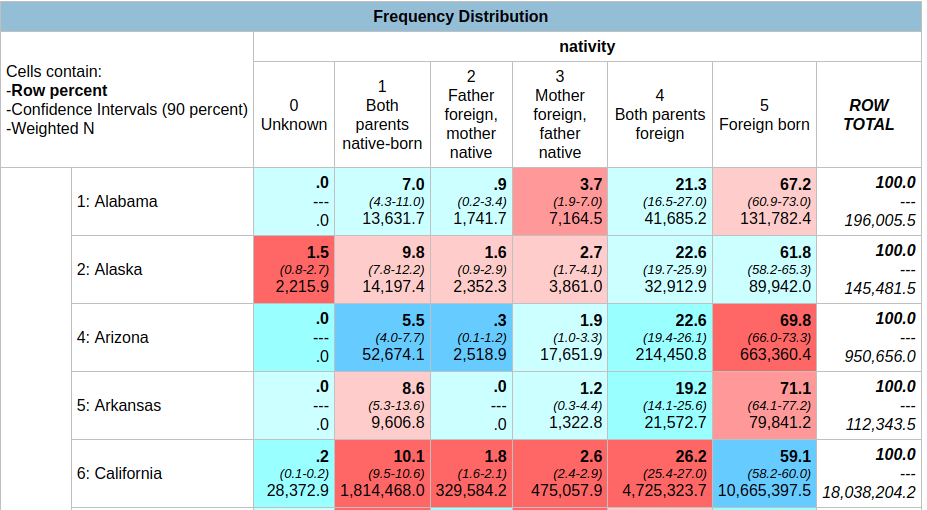
Add more years in the year filter, separated by commas. In this version, our confidence intervals are much narrower; notice for Asians for both parents foreign born in Arkansas is now 19.2% with a range of 14.1% to 25.6%. By increasing the sample pool with more years of data, we’ve increased the precision of the estimate at the cost of accepting a broader time period. One big caveat here: the Weighted N represents the total number of estimated cases, but since we are looking at five years of data instead of one it no longer represents a total population value for a single year. If we wanted to get an average annual estimate for this 5-year time period (similar to what the ACS produces), we’d have to divide each of estimates by five for a rough approximation. You can download the table and do these calculations in a spreadsheet or stats program.

Output Table – Nativity by State for Asians between 2016-2020 (weighted N = estimate of total cases over 5 years, not an average annual value)

You can also add control variables to a crosstab. For example, if you added sex as a control variable, you would generate separate female and male tables for the nativity by state for the Asian population over a given time period,

Example of a Profile Table

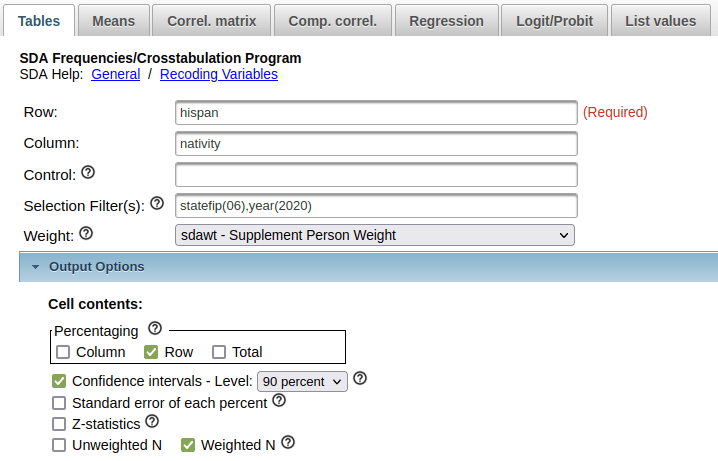
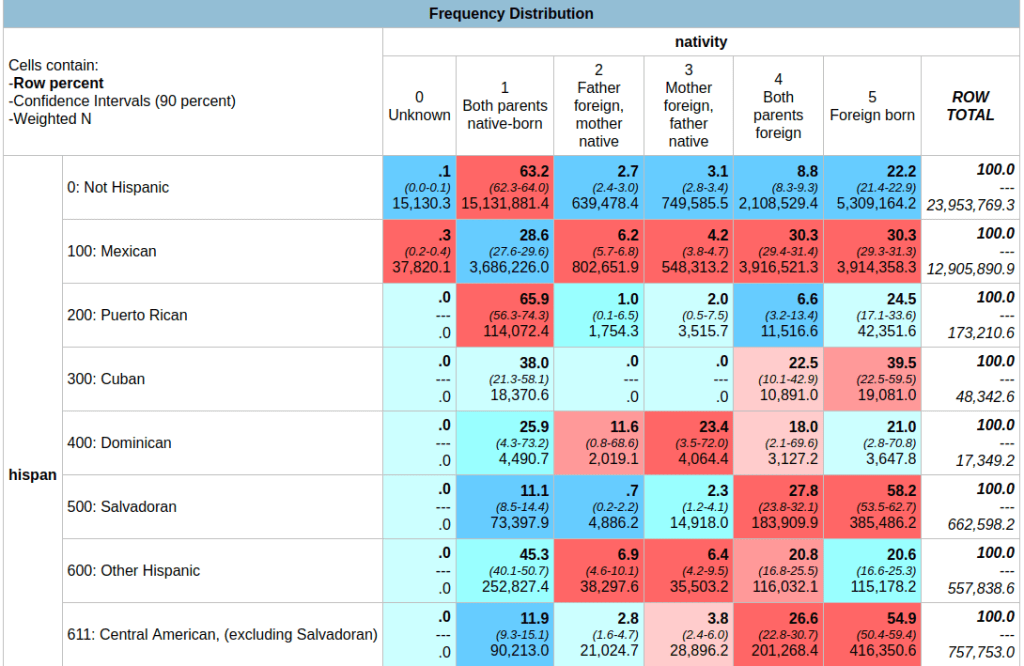
If we wanted to generate a profile for a given place as opposed to a comparison table, we can swap the variables we have in the rows and columns. For example, to see nativity for all Hispanic subgroups within California for a single year:

Input Parameters – Generate a Profile Table for California of Nativity by Hispanic Groups in 2020

In this case, you could opt to calculate percentages by column instead of row, if you wanted to see percent totals across groups for the categories. You could show both in the same chart, but I find it’s difficult to read. In this last example, note the large confidence intervals and thus lower precision for smaller Hispanic groups in California (Cuban, Dominican) versus larger groups (Mexican, Salvadoran).

Output Table – Nativity by Hispanic Groups in California 2020 (confidence interval is much larger for smaller groups)

In short – this is handy tool if you want to generate some quick estimates and crosstabs from the CPS without having to download and weight microdata records yourself. You can create geographic data for regions, divisions, states, and metro areas. Just be mindful of confidence intervals as you drill down to smaller subgroups; you can aggregate by year, geography, or category / group to get better precision. What I’ve demonstrated is the tip of the iceberg; read the documentation and experiment with creating charts, statistical summaries, and more.

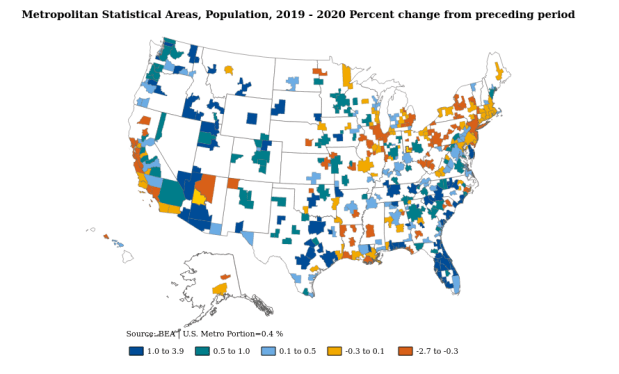
BEA Population Change Map

Population and Economic Time Series Data from the BEA

In this post, I’ll demonstrate how to access and download multiple decades of annual population data for US states, counties, and metropolitan areas in a single table. Last semester, I was helping a student in a GIS course find data on tuberculosis cases by state and metro area that stretched back several decades. In order to make meaningful comparisons, we needed to calculate rates, which meant finding an annual time series for total population. Using data directly from the Census Bureau is tough going, as they don’t focus on time series and you’d have to stitch together several decades of population estimates. Metropolitan areas add more complexity, as they are modified at least a few times each decade.

In searching for alternatives, I landed at the Bureau of Economic Analysis (BEA). As part of their charge is studying the economy over time, they gather data from the Census Bureau, Bureau of Labor Statistics, and others to build time series, and they update them as geography and industrial classification schemes change. They publish national, state, metropolitan area, and county-level GDP, employment, income, wage, and population tables that span multiple decades. Their economic profile table for metros and counties covers 1969 to present, while the state profile table goes back to 1958. Metropolitan areas are aggregates of counties. As metro boundaries change, the BEA normalizes the data, adjusting the series by taking older county-level data and molding it to fit the most recent metro definitions.

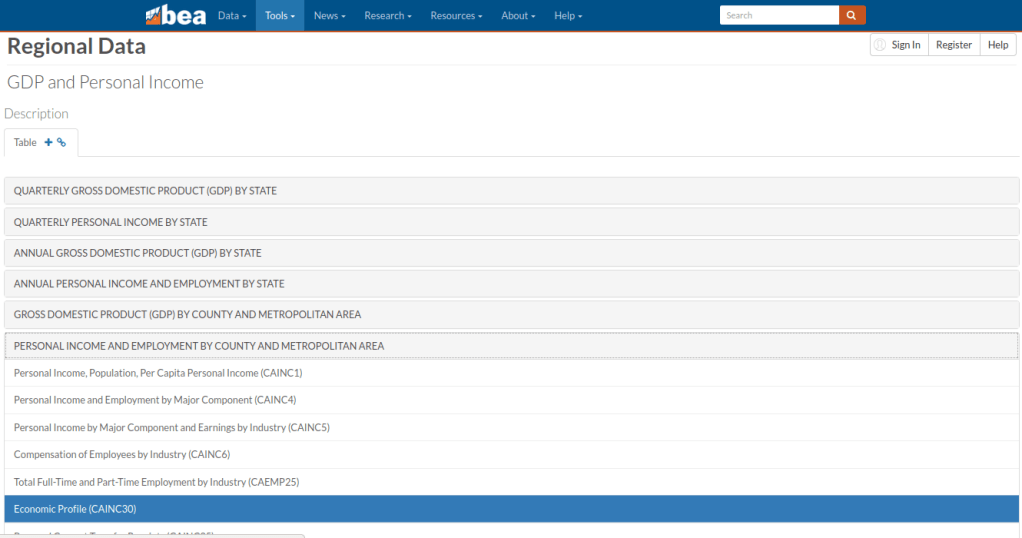
Finding the population data was a bit tricky, as it is embedded as one variable in the Economic Profile table (identified as CAINC30) that includes multiple indicators. Here’s the path to get it:

  • From the BEA website, choose Tools – Interactive Data.
  • From the options on the next page, choose Regional from the National, Industry, International or Regional data options. There’s also a link to a video that illustrates how to use the BEA interactive data tool.
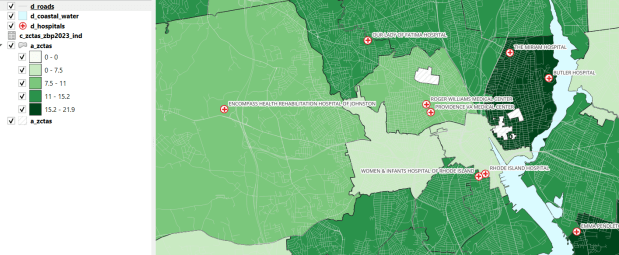
  • From the Regional Data page, click “Begin using the data” (but note you can alternatively “Begin mapping the data” to make some basic web maps too, like the one in the header of this post).
  • On the next page are categories, and under each category are data tables for specific series. In this case, Personal Income and Employment by County and Metropolitan Area was what I wanted, and under that the Economic Profile CAINC30 table (states appear under a different heading, but there’s a comparable Economic Profile table for them, SAINC30).
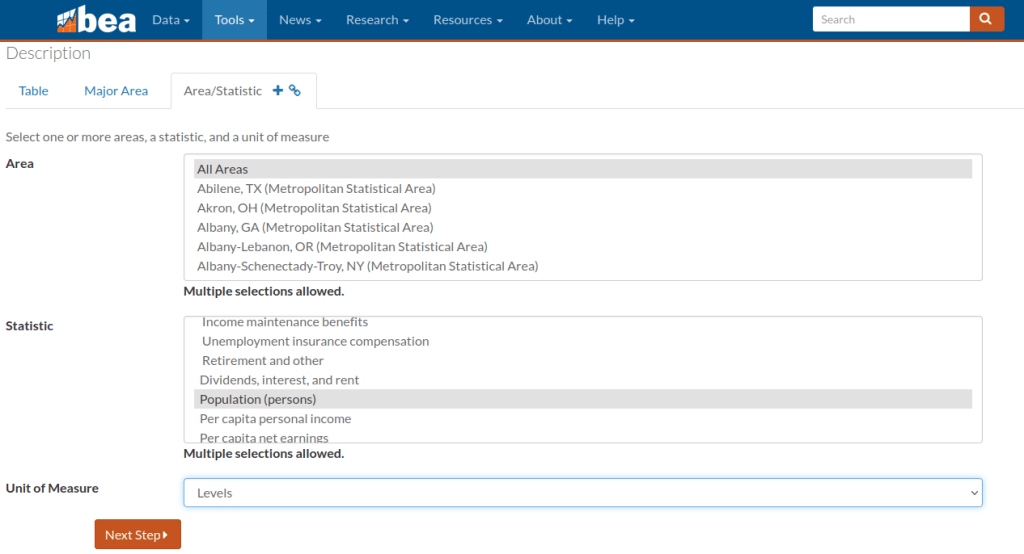
  • On the multi-screen table builder, you choose a type of geography (county or different metro area options), and on the next tab you can choose individual places, hold down CTRL and select several, or grab them all with the option at the top of the dropdown. Likewise for the Statistic, choose Population (persons), or grab a selection, or take all the stats. Under the Unit of Measure dropdown, Levels gives you the actual statistic, but you can also choose percent change, index values, and more. On the next tab, choose your years.
  • On the final page, if your selection is small enough you can preview the result and then download. In this case it’s too large, so you’re prompted to grab an Excel or CSV file to download.

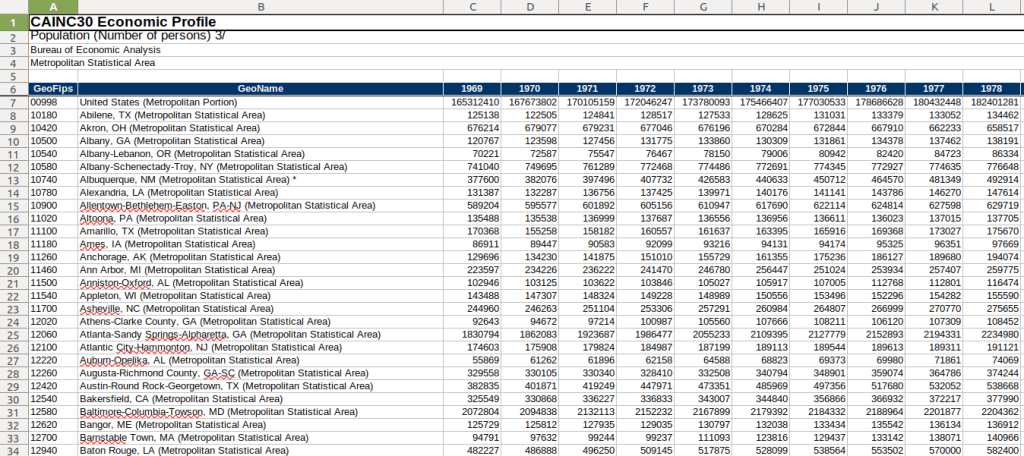
And there you have it! One table with 50+ years of annual population data, using current metro boundaries. The footnotes at the bottom of the file indicate that the latest years of population data are based on the most recent vintage estimates from the Census Bureau’s population estimates. Once the final intercensal estimates for the 2010s are released, the data for that decade will be replaced a final time, and the estimates from the 2020s will be updated annually as each new vintage is released until we pass the 2030 census. Their documentation is pretty thorough.

BEA 5-decade Time Series of Population Data by Metro Area

The Interactive Data table approach allows you to assemble your series step by step. If you wanted to skip all the clicking you can grab everything in one download (all years for all places for all stats in a given table). Of course, that means some filtering and cleaning post-download to isolate what you need. There’s also an API, and several other data series and access options to explore. The steps for creating the map that appears at the top of this post were similar to the steps for building the table.

US Census Data ALA Tech Report

ALA Tech Report on Using Census Data for Research

I have written a new report that’s just been released: US Census Data: Concepts and Applications for Supporting Research, was published as the May / June 2022 issue of the American Library Association’s Library and Technology Reports. It’s available for purchase digitally or in hard copy from the ALA from now through next year. It will also be available via EBSCOhost as full text, sometime this month. One year from now, the online version will transition to become a free and open publication available via the tech report archives.

The report was designed to be a concise primer (about 30 pages) for librarians who want to be knowledgeable with assisting researchers and students with finding, accessing, and using public summary census data, or who want to apply it to their own work as administrators or LIS researchers. But I also wrote it in such a way that it’s relevant for anyone who is interested in learning more about the census. In some respects it’s a good distillation of my “greatest hits”, drawing on work from my book, technical census-related blog posts, and earlier research that used census data to study the distribution of public libraries in the United States.

Chapter Outline

  1. Introduction
  2. Roles of the Census: in American society, the open data landscape, and library settings
  3. Census Concepts: geography, subject categories, tables and universes
  4. Datasets: decennial census, American Community Survey, Population Estimates, Business Establishments
  5. Accessing Data: data.census.gov, API with python, reports and data summaries
  6. GIS, historical research, and microdata: covers these topics plus the Current Population Survey
  7. The Census in Library Applications: overview of the LIS literature on site selection analysis and studying library access and user populations

I’m pleased with how it turned out, and in particular I hope that it will be used by MLIS students in data services and government information courses.

Although… I must express my displeasure with the ALA. The editorial team for the Library Technology Reports was solid. But once I finished the final reviews of the copy edits, I was put on the spot to write a short article for the American Libraries magazine, primarily to promote the report. This was not part of the contract, and I was given little direction and a month at a busy time of the school year to turn it around. I submitted a draft and never heard about it again – until I saw it in the magazine last week. They cut and revised it to focus on a narrow aspect of the census that was not the original premise, and they introduced errors to boot! As a writer I have never had an experience where I haven’t been given the opportunity to review revisions. It’s thoroughly unprofessional, and makes it difficult to defend the traditional editorial process as somehow being more accurate or thorough compared to the web posting and tweeting masses. They were apologetic, and are posting corrections. I was reluctant to contribute to the magazine to begin with, as I have a low opinion of it and think it’s deteriorated in recent years, but that’s a topic for a different discussion.

Stepping off the soapbox… I’ll be attending the ALA annual conference in DC later this month, to participate on a panel that will discuss the 2020 census, and to reconnect with some old colleagues. So if you want to talk about the census, you can buy me some coffee (or beer) and check out the report.

A final research and publication related note – the map that appears at the top of my post on the distribution of US public libraries from several years back has also made it into print. It appears on page 173 of The Argument Toolbox by K.J. Peters, published by Broadview Press. It was selected as an example of using visuals for communicating research findings, making compelling arguments in academic writing, and citing underlying sources to establish credibility. I’m browsing through the complimentary copy I received and it looks excellent. If you’re an academic librarian or a writing center professional and are looking for core research method guides, I would recommend checking it out.