Author: Frank

Head of GIS & Data Services at Brown University Library

The Map Reliability Calculator for Classifying ACS Data

The staff at the Population Division at NYC City Planning take the limitations of the American Community Survey (ACS) data seriously. Census estimates for tract-level data tend to be unreliable; to counter this, they aggregate tracts into larger Neighborhood Tabulation Areas (NTAs) to produce estimates that have better precision. In their Census Factfinder tool, they display but grey-out variables where the margin of error (MOE) is unacceptably large. If users want to aggregate geographies, the Factfinder does the work of re-computing the margins of error.

Now they’ve released a new tool for census mappers. The Map Reliability Calculator is an Excel spreadsheet for measuring the reliability of classification schemes for making choropleth maps. Because each ACS estimate is published with a MOE, it’s possible that certain estimates may fall outside their designated classification range.

For example, we’re 90% confident that 60.5% plus or minus 1.5% of resident workers 16 years and older in Forest Hills, Queens took public transit to work during 2011-2015. The actual value could be as low as 59% or as high as 62%. Now let’s say we have a classification scheme that has a class with a range from 60% to 80%. Forest Hills would be placed in this class since its estimate is 60.5%, but it’s possible that it could fall into the class below it given the range of the margin of error (as the value could be as low as 59%).

The tool determines how good your classification scheme is by calculating the percent of estimates that could fall outside their assigned class, based on each MOE and the break point of the class. On the left of the sheet you paste your estimates and MOEs, and then type the number of classes you want. On the right, the reliability of classifying that data is calculated for equal intervals (equal range of values in each class) and quantiles (equal number of data points in each class). You can see the reliability of each class and the overall reliability of the scheme. The scheme is classified as reliable if: no individual class has more than 20% of its values identified as possibly falling outside the class, and less than 10% of all the scheme’s values possibly fall outside their classes.

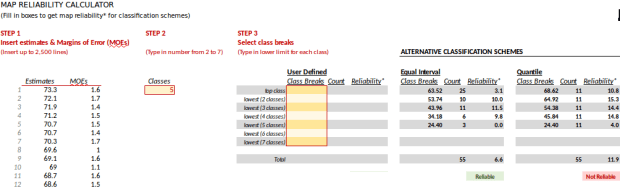
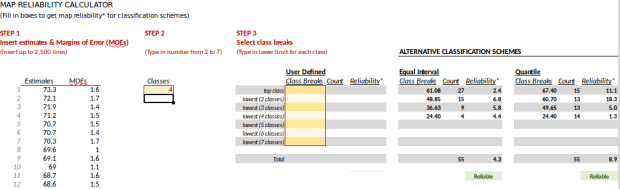
I pasted some 5-year ACS data for NYC PUMAs below (the percentage of workers 16 years and older who take public transit to work in 2011-2015) under STEP 1. In STEP 2 I entered 5 for the number of classes. In the classification schemes on the right, equal intervals is reliable; only 6.6% of the values may fall outside their class. Quantiles was not reliable; 11.9% fell outside. If I reduce the number of classes to 4, reliability improves and both schemes fall under 10%; although unreliability for one of the classes for quantiles is high at 18%, but still below the 20% threshold. Equal intervals should usually perform better than quantiles, as the latter scheme can make rather arbitrary breaks that result in small differences in value ranges between classes (in order to insure that each class has the same number of data points).

Map reliability calculator with 5 classes

Map reliability calculator with 4 classes

You can also enter custom-defined schemes. For example let’s say you use natural breaks (classes determined by gaps in value ranges). There’s a 2-step process here; first you classify the data in GIS and determine what the breaks are, and then you enter them in the spreadsheet. If you’re using QGIS there’s a snag in doing this; QGIS doesn’t show you the “true” breaks of your data based on the actual values, and when you classify data it displays clean breaks that overlap. For example, natural breaks of this data with 5 classes appears like this:

24.4 – 29.0
29.0 – 45.9
45.9 – 55.8
55.8 – 65.1
65.1 – 73.3

So, does the value for 29.0 fall in the first class or the second? The answer is, the first (test it by selecting that record in the attribute table and see where it is on the map, and what color it is). So you need to adjust the values appropriately, paying attention to the precision and scale of your numbers. In this case I bump the first value of each class up by .1, except for the bottom class which you leave alone:

24.4 – 29.0
29.1 – 45.9
46.0 – 55.8
55.9 – 65.1
65.2 – 73.3

In the calculator you have to enter the top class value first, and just the first value in the range:

65.2
55.9
46.0
29.1
29.4

Map reliability calculator with user defined classes

In this case only 7.1% of the total values may fall outside their class so things look good – but my bottom class barely makes the minimum class threshold at 19.4%. I can try dropping the classes down to 4 or I can manually adjust this class to see if I can improve reliability.

If you’re unsure if you made the right adjustments to the classes in translating them from QGIS to the calculator, in QGIS turn on the Show Feature Count option for the layer to see how many data points are in each class, and compare that to the class counts in the calculator. If they don’t match, you need to re-adjust.

QGIS natural breaks and feature count

This is a great tool for census mappers who want or need to account for issues with ACS reliability. It’s an Excel spreadsheet but I used it in LibreOffice Calc with no problem. In addition to the calculator sheet there’s a second sheet with instructions and background info. Download the Map Reliability Calculator here. You can try it out with this test data,  workers who commute with mass transit, 2011-2015 ACS for NYC PUMAs.

Note Taking for Academic Research

I’ve been reviewing a lot of literature over the past year in preparation for writing my book, so note taking is at the forefront of my mind. Grad students occasionally ask me for suggestions on how to effectively take notes, so I’ll share some pointers here. I’ll begin with my quest to find the right note taking software, followed by my actual process for taking notes.

Finding the Right Tool

Ten years ago, I suddenly found myself back in a position where I needed to write academic papers, something I hadn’t done since I wrote my master’s thesis about eight years before that. At that time, I was still using the techniques I had learned in high school (a much longer time ago…). Back then, you were either an index card person or a binder person. The card people would write one note on each card, while binder people kept a ledger of notes and would add additional pages as needed. You’d classify your notes as summaries, paraphrases, or quotations.

I assumed that my high school methods must be outdated by now, so I cast around to see what note taking software was available. I knew I wanted to go open source, as I didn’t want my notes tethered to a specific tool and stored in proprietary format. There were a lot of options, and I quickly became bogged down and frustrated with trying them all. I felt that much of the software forced me to conform to it, and I was spending too much time fidgeting and figuring things out.

I abandoned the search and recorded my notes in a simple text (aka notepad) document. I had always been a binder person, so the single document approach appealed to me. I could copy and paste, use spell check, and search for keyword terms that I assigned (the Linux editors like gedit, leafpad, and xed are lightweight but more robust than MS Notepad). This worked fine for a stand-alone paper and I still use this approach for small projects. But as my research became on-going I needed to rely on these notes for many future projects. The single notepad document grew unwieldy and browsing and searching became difficult.

A few years later, I made a second attempt at searching for note taking software, and this time I broadened the search to include more general-purpose options. My solution: use a wiki! With a wiki, every single source can have it’s own page, the sources can be grouped together under thematic categories, you can assign tags, and you can search across all the pages. I could also add links between pages and out to the web, and could link the notes to the source documents. The wiki was so open ended that I didn’t feel constrained in writing my notes to fit a particular interface, nor did I have to waste a lot of time sifting though buttons and tools.

I opted for a desktop wiki called Zim, which has been actively maintained since 2008. All of the pages in Zim are saved as individual text files in a basic wiki mark-up, which insures that they can be accessed outside the program. Pages are stored in a notebook which is essentially just a folder. If you create hierarchies of pages, these categories become folders and sub-folders. Zim has a ton of extra plugins so you can do spell checking, concept mapping, you can create formulas, calendars, and more. You can also export your entire notebook or portions of it out as HTML or LaTeX files.

Most importantly, the wiki solved one of my most vexing problems. I found that a lot of the note taking software was geared towards just taking notes, and couldn’t handle keeping track of citations. Citation software is it’s own genre, and I found that those packages were poor for taking notes. With Zim, I create a page dedicated to each source, and at the top of each page I embed some BibTeX code for storing the citation data. BibTeX is a format that’s used for creating LaTeX bibliographies, but it has become a common standard and can be used by word processors too. I have a template page (see below) with several BibTeX document types that I just copy and paste when I have a new source to add. Since the pages are saved as plain text, I wrote a short Python script (appears at the end of this post) that loops through my note pages, scrapes out the BibTeX records, and creates a BibTeX file that I can use in LaTeX. Within the BibTeX record I store a link to the source: either to a PDF I have locally, or a web page (if it’s a site), or a WorldCat catalog record (if it’s a book). So all my notes, citations, and the source material are kept together in one place!

BibTeX templates

Zim is desktop software that you have to download and install locally. Since the notebook consists of text files in folders, it’s easy to back it up into Box or DropBox or whatever you use. Zim doesn’t save histories or have version control, but there’s a plugin that lets you sync your files with Git and other systems.

Relying on Tried and True Methods

While the right tool is important, it’s really the method that counts. I learned that I had to jettison the idea that the note taking process has to be 100% efficient. While you certainly don’t want to flail around and waste time, note taking is not supposed to be quick and easy. The only way you can truly learn new material is to spend time with it: reading, re-reading, taking notes, and reading the notes. The process of note taking is equally if not more important than the actual notes themselves, as the process is what helps you to synthesize and learn the material. While I left the binder and note cards behind, the actual note taking process was similar to what I did in high school.

I always download articles and bookmark websites or catalog records as I’m doing my searches. Once I complete a series of searches and have gathered material from the web and library databases, I sift through the files and rename them using the first author’s last name and the year of publication (i.e. Jones2017). I’ll also use this file name as the BibTeX key that uniquely identifies the article. I create a documents folder with sub-folders for articles, books, and reports, and I keep these folders in the same location as the ZIM notebook. There’s no reason to create lots of topical or thematic folders, as you can use the wiki to categorize and tag the notes, and the wiki becomes the vehicle for searching or browsing through the documents.

As I sort through the sources I identify what’s essential and what’s ancillary. High priority sources will be read thoroughly and covered in detail, while the low-priority stuff will be skimmed and summarized. High priority sources are critical to your research and include touchstone articles in your field, excellent case studies, relevant background material, and any past research that remotely resembles what you’re working on. Low priority sources may have one important fact or concept that you need to remember; these materials are more tangential to your work and ultimately you might cite them in passing, or even not at all.

I always print out the high-priority articles. I’ll read it first, and then I’ll go back and do a second read and mark passages with a high-lighter. Next, I’ll create and type notes directly into the wiki. I might read and mark up a couple articles before I start note taking, but I don’t wait too long as I want the articles fresh in my memory. For essential books, I’ll read a chapter or two at a time and mark passages with little sticky flags. Then I’ll go back and take notes in a paper notebook, and will keep doing that until I finish the book. Then I transcribe all the notes for the book onto my laptop. This takes longer, but once again it’s not all about efficiency. I get to spend more time with the material and it helps me absorb it. This approach also separates the computer from the reading, which cuts down distractions and provides more flexibility in terms of where I can work. Reading in a comfortable chair or outside is preferable to reading while sitting at a table with a laptop.

Note flags in book

I never print out or mark up low-priority articles; I skim through the digital copies and write a summary directly in the wiki. For books, I read the book in one go and may use sticky flags here and there, and when I’m done I type the notes directly into the wiki.

For the notes themselves, each note page has the title and author prominently at the top followed by a summary of the source, and then the BibTeX citation (see below). Low-priority materials usually get nothing but a summary and a citation. High-priority materials get detailed notes. Each note is written as a bullet point, and can represent one important fact or insight, or can be a summary of a paragraph or several pages, or even a summary of a chapter. It depends on how important the material is relative to my work.

Zim Wiki

Taking notes is not like writing a book report. I’m not writing an even or objective summary of the material in it’s entirety. Instead, I’m picking out the pieces that are of interest to me and to the work I’ll be doing, and I skip the rest. Sometimes I’ll editorialize (this is great, or this stinks) but I write in such a way that my thoughts are distinct from what the author is saying. This is where efficiency comes into the picture: identify sources that are high versus low priority, and summarize the source and identify just the specific details that are relevant to you. You’re writing these notes with specific research goals in mind, so don’t waste time writing a generic book report.

I always summarize or paraphrase the material as I take notes, putting concepts in my own words. Doing this forces you to wrestle with the concepts and internalize them, which improves your understanding of the material and your memory for it. It also helps guard against plagiarism; once you start writing the paper, you’ll know your notes are already in your own words and you can use them freely. If I do quote something directly, I always surround it with quotation marks. Lastly, at the end of my note I provide the page numbers to indicate what’s been summarized, so I can go back if need be.

Note taking is an idiosyncratic process. What works for you may not work for someone else and vice versa. The key is to figure out what works best for you; create a system, try it out, and once you’re happy go with it. You can always tweak things as you move along. The notes will help you when it comes time to pull your ideas together into a cohesive paper, but it’s the reading and note taking process that helps you to become proficient with the subject matter.

As I was re-learning how to take notes, I found the handouts from the University of Melbourne’s Academic Skills Unit to be particularly valuable. This is their latest version of Taking Notes From Texts, and this is the older version that I stumbled on years ago.

(Python code for scraping BibTeX records out of wiki notes to create a bibliography is posted below).

#Parse notes stored in zim wiki to extract all bibtex records and write them
#to a new bibtex file named with today's date.

#Script must be stored directly above the notes folder where the wiki data
#is stored. It will ignore the empty bibtex template files and will only
#read wiki files stored as .txt.

#Within the wiki, all bibtex records in the notes are enclosed in a bibtex tag.
#The script reads each line and ignores them until it finds the open
#tag. Then it starts writing each line until it reads the close  tag.
#A line return is appended so records are separated in the output file.

#A list and count of extracted records is provided as a diagnostic

import os, datetime

now=datetime.date.today()
path='.'
outfile='sources_'+str(now)+'.bib'

writefile=open(outfile,'w')

counter=0
titles=[]

for (subdir,dirs,files) in os.walk(path):
    if 'Templates' in dirs:
        dirs.remove('Templates')
    if 'documents' in dirs:
        dirs.remove('documents')
    for f in files:
        if f[-4:]=='.txt':
            readfile=open(os.path.join(subdir,f),'r')
            for line in readfile:
                if line.startswith('<bibtex>'):
                    break
            for line in readfile:
                if line.startswith('</bibtex'):
                    titles.append(f)
                    writefile.write('\n')
                    counter=counter+1
                    break
                else:
                    writefile.write(line)
            readfile.close()
writefile.close()

titles = [t.replace('_', ' ') for t in titles]
titles=[t.strip('.txt') for t in titles]
titles.sort()
print('Bibliographic records have been extracted for the following sources:','\n')
for title in titles:
    print('*',title)
print('\n')
print(counter,'bibilographic records have been parsed and written to',outfile)
Census Counts and Facebook Flubs

So I’m one month into my year-long sabbatical and I’m still cranking away at writing a book proposal for my guide to working with US Census data. I’m positioning the census as one of the original open datasets given its history as a transparent, public domain dataset that plays many key roles in our society, and I’m considering how it fits within the larger data universe.

I recently stumbled across this story, about Facebook telling advertisers and investors that Facebook could reach 41 million adults between the ages of 18 and 24 in the US this year with ads. They also claimed they could reach 60 million people between the ages of 25 and 34. Sounds impressive, right?

Well, an analyst at an equity research firm did some homework, and discovered a problem: according to the Census Bureau, there are currently (as of 2016) only 31 million adults between the ages of 18 and 24 in the United States. Where are Facebook’s extra 10 million people coming from? It gets worse: the Census says there are only 45 million people aged 25 to 34 in the US, 15 million fewer than Facebook’s “reach”. This isn’t just a local phenomena; Facebook says it can reach more people than actually exist in the UK, Australia, Ireland, and France.

When faced with these large discrepancies, Facebook responded with a canned statement that their tools for producing these estimates “…are designed to estimate how many people in a given area are eligible to see an ad a business might run. They are not designed to match population or census estimates. We are always working to improve our estimates.”

Ok, but that’s not how the information was originally presented to the advertising and investment firms, who were nonplussed to say the least. If you say you can reach 41 million adults between ages 18 and 24 in the US, the natural assumption is we’re talking about residents. You would also assume that this estimate, at best, could only represent a certain percentage of that population. You wouldn’t expect the ads could reach all of them, and certainly not more than what actually exists.

Here are a few take-aways from this story. First, while census data isn’t as timely or seemingly “hip” as the new social media data, it is produced by professional statisticians and geographers dedicated to high quality, transparent, demographic data. The census serves as a baseline that other population data can be measured against, and as a foundation on which other datasets can be built. If you are generating population estimates for an area, comparing your estimates to the census should be a matter of common sense. It was to the investment researcher, but apparently not to Facebook.

Second, all data sets have shortcomings and suffer from some degree of bias or error; the decennial census has historically had problems with under-counting, and the margins of error for American Community Survey data for small geographies and populations can be unacceptably large. But at least the process is transparent, so we can understand the limitations and account for them. Furthermore, the census officials know the shortcomings and they develop methodologies to amend and correct data (to the extent they can) before it’s published.

In contrast, the data produced by Facebook, Google, and the like is anything but transparent. Not only can’t we see how it’s collected, most of us don’t have access to the data itself unless the companies choose to feed us some crumbs or allow us to jump through hoops (ironic as their data is really our data in aggregate). Naturally it will suffer from limitations – people on Facebook can mis-represent their age, ad targeting is based on location data that includes residents and visitors, there can be (gasp) fake accounts! But there’s no way for end users to see, correct, or account for these shortcomings. There is little or no documentation. Users just have to hope that the company has studied and scrubbed their data, or that the company understands the data’s limitations and presents it to others appropriately.

Here are the latest population estimates for the US broken down by age and gender. There are also some neat population clocks, and a pyramid – click the pic to visit.

census population pyramid

foss4g boston 2017 logo

FOSS4G 2017 Round Up

A month ago at this time I was in Boston for FOSS4G 2017 (Free and Open Source for Geospatial), which is the international conference for free and open source GIS enthusiasts, developers, educators, and practitioners. I updated my introductory GIS / QGIS workshop manual to 2.18 Las Palmas (which is slated to be the next long term service release once 3.0 comes out) and Anastasia, Janine, and I took the workshop on the road. We had a good turnout and an excellent class, and then were able to enjoy the three days of sessions. Here are some of the high-lights from sessions I attended.

  • The NYC Department of City Planning has hired their own, internal open source developer and is assembling a team called NYC Planing Labs. Their first project was to revamp the city facilities database and build the NYC Facilities Explorer, a web mapping interface that sits on top of the database and makes it easy for folks to browse and visualize.
  • There was an interesting talk from an independent research unit that’s affiliated with the University of Chicago. The speaker outlined their process for switching their team from ESRI to open source. The talk gave me appreciation for the amount of work that’s involved for transitioning a team of service providers from one set of tools to another. This group did things the right way, doing necessary background research and identifying short, medium, and long term plans for making the switch. Their biggest revelation was that they ended up shifting funds from purchasing licenses to staff, which has allowed them to expand their activities.
  • PostGIS 2.4 will add a number of functions that were only available for the geometry type, like ST_Centroid, to the geography type. PostgreSQL 10 is going to allow users with big databases to take greater advantage of parallel computing.
  • Some archaeologists are looking to adapt the schema used by Open Street Map to create an OpenHistoryMap. There aren’t many global standards for cataloging archaeological data; it’s primarily site and project specific. Unique challenges include the importance of scale (need to see that pot shard in a room, in a house, in the overall site, in the greater region…) and varying degrees of reliability. Once an artifact is found there isn’t absolute certainty regarding it’s age, provenance, or use. This project (Open History Map) is different from Open Historical Map; the latter relies on data that’s already in OSM and describes the past as a function of the present.
  • I tend to use GRASS GIS in limited circumstances, but am always pleasantly surprised when I follow up to see what’s new. The big selling points are stability, backwards compatibility, and the ability to do a lot via the command line. For version 7.2 there are several improvements: an improved GUI, a data catalog, a more sophisticated Python editor, easier vector legend tools, an advanced search feature for finding modules, and temporal algebra. I’m not a heavy raster user and never work in 3D, but these have always been and continue to be major strengths of GRASS. They also have a growing repository of 3rd party plugins and modules.
  • One of the plenary speakers gave us a demo of R markdown for creating websites, documents, and even for writing books. It gives you the ability to easily import data and write R code to produce a chart, graph, or map right in the same document as your narrative text. So instead of doing a basic analysis, creating a chart, and writing up your project in three different places you can do it all in one place and compile it to HTML or PDF. With the source, readers also have the benefit of seeing what you did and they can test the results.
  • R has really come a long way for geospatial analysis and visualization. I can’t remember it even being mentioned at the last FOSS4G I attended in 2011, but in 2017 it was a major component of the conference. In trying to figure how it fits in to the landscape, I assumed that it was a matter of background and preference. People who have a stats background and want to do geospatial work are going to gravitate towards it, while people with more of a programming or data processing background may be more disposed to using Python or Javascript. The plenary speaker framed R as an exploratory language that’s great for iterative work – let me quickly graph this data to see what it looks like, then I’ll write another piece to view it a different way. Other scripting languages tend to tackle more tasks in one large batch in a linear fashion.
  • The contingent of academic GIS and geospatial librarians and developers has been growing at this conference over the years. There was an opportunity for the Open Geoportal and Geoblacklight communities to get together and exchange notes. Both groups have a commitment to open metadata standards and resource sharing.
  • OSGeo folks have been active in promoting free and open source GIS education, and have created a directory of GIS labs around the world.
  • Just when you thought you were confused about which tool to use, here’s another one – Vega, a declarative JSON grammar for creating graphs and charts.
  • QGIS 3.0 is on the horizon; it will encompass a shift from Qt 4 to 5 and Python 2 to 3. There are a number of great new features: a task manager, a data source manager to replace the dozen individual buttons in 2.x, better support for metadata viewing and editing, more 3D tools, multiple map canvases, the ability to store different user profiles (to save your plugins and layouts on shared machines), better digitizing tools, and a whole lot more. A lot of plugins will disappear as they make their way into the processing toolbox, the stand-alone QGIS Browser will be dropped as its functions are integrated into QGIS Desktop, and map projects created in 3.x will not be backward compatible to 2.x. The time line says that 3.0 will be launched in late Nov 2017, and at that point 2.18 will become the LTS release. It will take another year, til Nov 2018, when 3.2 becomes the LTS. If you’re like me and favor stability over new features, you can stick with 2.x for the another year.
  • A good talk on community health mapping introduced a stack that you can use for data gathering (Fulcrum), analysis (QGIS) and publishing on the web (Carto). I’m well versed in the last two, but didn’t know about Fulcrum. Essentially it’s an app that you can use on phones and tablets to gather data out in the field, including GPS coordinates. On his blog he’s created a series of lab exercises that cover the entire stack, so the communities can learn the process and take ownership of it and the tools.

Planning for FOSS4G 2018 is well underway. The conference uses a three year rotation where it goes from Europe to North America to another continent. Next year it’s Africa’s turn as the conference heads to Dar es Salaam in Tanzania.

Inaugural Post – At These Coordinates

Greetings and welcome to At These Coordinates. After ten years of blogging at gothos.info I decided it was time to start fresh. I’m still going to be covering similar topics – geospatial data, data sources, scripting, GIS, the Census – but wanted to do a reboot for a few reasons.

  1. I’m at the beginning of a transition period. I’ve just started a year-long sabbatical to write a book on US Census data, and I’m hoping this and some other projects will lead me to new horizons. So it seems like a fitting time to start something new.
  2.  Looking back at my old site, I had written some thorough and detailed technical posts that helped many folks and helped me to keep track of what I did, but I’ve come to realize they were often missing something important: my voice. I’m hoping to express more of my own thoughts and opinions in these new pages, and perhaps I’ll invite some others to contribute too.
  3. I was using a web service provider and a separate domain name registry, which was overkill for me. Using WordPress.com is more straightforward and better fits my needs.

I’ve brought over a few of my most recent posts and some greatest hits from my old blog, and assigned them to the category gothos.info (which is why there are posts here that are older than this inaugural post). Gothos will vanish in January 2018 but is preserved in the Internet Archive. From here on out it will be new territory. Here we go!

Copying Tables from SQLite to PostgreSQL

We recently created a PostgreSQL / PostGIS database on a server on our local campus network and spent the last few months loading data into it. We have a couple of different SQLite / Spatialite projects that we produce and I needed to move a large number of attribute tables from them into the Postgres database. My initial idea was to simply create a SQL dump file out of SQLite and then restore it in Postgres. I encountered a number of problems in doing this; there are slight differences in how each database creates and handles dump files. The solutions I found involved lousy things like opening the dump file in an editor (not feasible if the file is huge) and finding and replacing parentheses and commas, or running the file through a script to remove them.

That gave me a better idea – Python has SQLite and PostgreSQL modules (sqlite3 and psycopg2 respectfully). I could connect to the SQLite database and load the tables into Python’s data structures, and then simply connect to my PostgreSQL database and write them out. The original CREATE TABLE statements are stored in a master table; if I grab those statements and then the data that goes with them, I can simply recreate everything. The code is below.

First I define a number of variables that I hard code for each batch of tables. The SQLite variables are the name and path to the database (sqdb) and a string that I’ll use in a LIKE clause to grab certain tables (sqlike). For example, if my series of tables starts with yr followed by a year (yr2017) my string would be ‘yr%’. The remaining variables are for the Postgres database: pgdb (database name), pguser, pgpswd (my username and password), pghost, pgport (address of the database server on port 5432), and pgschema which is the name of the schema I want to write to.

I connect to the SQLite database and read all the names of the tables that match my LIKE statement from the master table. This returns a series of tuples where the name of the table is in the first position; I grab these and save them in a list. Then I loop through that list of tables and get the CREATE TABLE statement that’s stored in the master table and save that in string variable called create. Then I fetch all the rows for that table and save them in a tuple called rows. Lastly, I count the number of columns and create the number of string substitutions I’ll need in my SQL statement in a place holder variable (minus the last character, to remove a comma from the end of the statement).

That gives me everything I need for the first table. Then I connect to Postgres, set my schema path, execute the create table statement, and load the values in. Voila! If successful, we return to the top of the table loop and grab the next table. When we’re all done, we close the connection to the database.

#Frank Donnelly, Geospatial Data Librarian
#May 22, 2017
#Copies tables and data from a SQLite database and recreates them
#in a PostgreSQL database

import psycopg2, sqlite3, sys

#Change these values as needed

sqdb=''
sqlike=''
pgdb=''
pguser=''
pgpswd=''
pghost=''
pgport='5432'
pgschema=''

consq=sqlite3.connect(sqdb)
cursq=consq.cursor()

tabnames=[]

cursq.execute("SELECT name FROM sqlite_master WHERE type='table' AND name LIKE '%s'" % sqlike)
tabgrab = cursq.fetchall()
for item in tabgrab:
    tabnames.append(item[0])

for table in tabnames:
    cursq.execute("SELECT sql FROM sqlite_master WHERE type='table' AND name = ?;", (table,))
    create = cursq.fetchone()[0]
    cursq.execute("SELECT * FROM %s;" %table)
    rows=cursq.fetchall()
    colcount=len(rows[0])
    pholder='%s,'*colcount
    newholder=pholder[:-1]

    try:

        conpg = psycopg2.connect(database=pgdb, user=pguser, password=pgpswd,
                               host=pghost, port=pgport)
        curpg = conpg.cursor()
        curpg.execute("SET search_path TO %s;" %pgschema)
        curpg.execute("DROP TABLE IF EXISTS %s;" %table)
        curpg.execute(create)
        curpg.executemany("INSERT INTO %s VALUES (%s);" % (table, newholder),rows)
        conpg.commit()
        print('Created', table)

    except psycopg2.DatabaseError as e:
        print ('Error %s' % e) 
        sys.exit(1)

    finally:

        if conpg:
            conpg.close()

consq.close()

There are a few caveats to this. First, data in SQLite is loosely typed, so you’re allowed to get away with storing strings in numeric columns and vice versa. PostgreSQL will balk at this, so if your SQLite data is pretty loose this approach (and any other approach really) will fall flat. You’d have to tighten up your SQLite data first.

Second, this approach doesn’t handle spatial data / geometry columns. In instances where I had spatial data and I tried copying it over, it failed; there are differences with how spatial data is tied to the underlying tables in each database so moving it requires a special process. I tried using some spatial database modules in Python but couldn’t get them working. Ultimately, since my spatial layers were point features and I had the original X and Y coordinates stored in numeric columns, I simply copied the data over and left the geometry behind, and once I was in PostGIS I recreated the geometry from the coordinates. Another alternative would be to use the OGR tools to copy spatial (and attribute) data over – I’ve tried this in a few other instances in the past with success, but was going in the opposite direction (from PostGIS to Spatialite) at the time.

While I haven’t tried it, you could modify the code if you wanted to go in the other direction (copy data from PostgeSQL to SQLite). You would just need to identify the system tables in PostgreSQL where the table names and create statements are stored. Going in this direction, the abundance of data types in PostgreSQL may be a problem – in SQLite your only options are: integer, real, text, and blob. SQLite may be able to take certain types and convert them to what it needs (i.e. take a varchar and save it as text) but I’m not sure it can handle every case. You could always run each create table statement string through a find and replace operation to modify the data types.