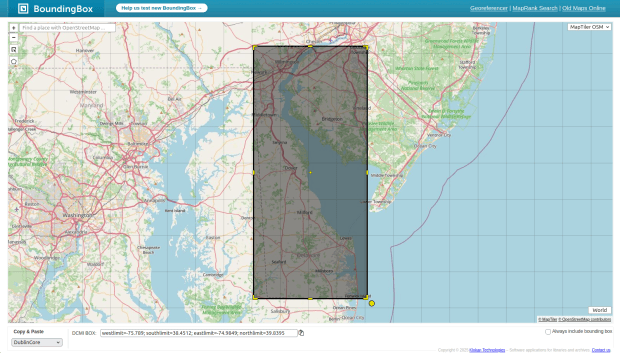
In this post, I’ll discuss some tools for creating bounding boxes, aka minimum bounding rectangles (MBR). This is the smallest rectangle that you can draw around a place or set of geospatial features that fully encloses it. Boxes can be recorded as four coordinate pairs, or as the set of coordinates that represent the minimum and maximum X and Y values.
For example, here is the MBR for my home state of Delaware, rendered in OGC WKT format as coordinate pairs. This provides you with proper geometry, so you can to render the box as a polygon:
POLYGON((-75.789 39.8395, -74.9849 39.8395, -74.9849 38.4512, -75.789 38.4512, -75.789 39.8395))
And here’s the same MBR rendered in Dublin Core metadata:
westlimit=-75.789; southlimit=38.4512; eastlimit=-74.9849; northlimit=39.8395
Shorthand versions like this are typically referred to as bounding coordinates, as opposed to a bounding box. It describes the limits of the area by minimum X, minimum Y, maximum X, and maximum Y, where X is longitude and Y is latitude. This Dublin Core example is a minimal one with coordinates only; see the specifications for a full-fledged record.
There are several reasons why bounding boxes or coordinates are useful. The first is for metadata, for describing the geographic extent of a dataset. Compared to place names, coordinates unambiguously describe where a place or set of features is located, and unlike a centroid it gives you a sense for the extent of the area. You can easily figure out the location and extent of coverage if you know your long and lat.
Second, boxes help power spatial searches and indexes. If you are using a geospatial data repository that has a map search, where you zoom into a map and see what datasets fall in that area, chances are that search is being powered by bounding box metadata. The extent of the web map on the screen is compared to the bounding box metadata, to determine if a dataset falls within the window. In a spatial database like PostGIS, a spatial index stores MBRs for each individual feature, and utilizes the index whenever you do a spatial operation like intersect to speed up processing. A feature is compared to other features that fall within its MBR, instead of comparing it iteratively to every single feature in the table.
A third reason is their use for data extraction and clip operations. I have used ERA 5’s climate rasters a few times over the past year for different projects. Rather than downloading the entire global grid, I was able to provide a set of bounding coordinates in the filter interface to extract data for a specific country, which saves download and processing time.
Check out Unlocking the Mysteries of Bounding Boxes if you’re interested in learning more about their application to metadata and spatial search. While the article is twenty years old, the concepts are still the same.
How can you quickly generate some bounding coordinates or a box? Here are four tools I’ve used.
USGS Map Extent Helper
This well-documented browser-based tool was developed as part of the National Geologic Map Database, specifically for the archivist and librarian community. It provides a few different ways to sketch a box against a base map of imagery or topography, and lets you output the result in a number of different metadata formats including MARC, Dublin Core, and FGDC, as well as data formats like CSV, OGC WKT, and GeoJSON. You can customize the interface to turn off output formats you don’t need, and your browser will remember the settings. You can copy and paste the resulting metadata into your record, or for the file formats you can paste them into a plain text document and save the result with the matching extension .csv, .json, etc. You can even generate a url for the extent and save it, to share it with others or to simply to remember it for future use.
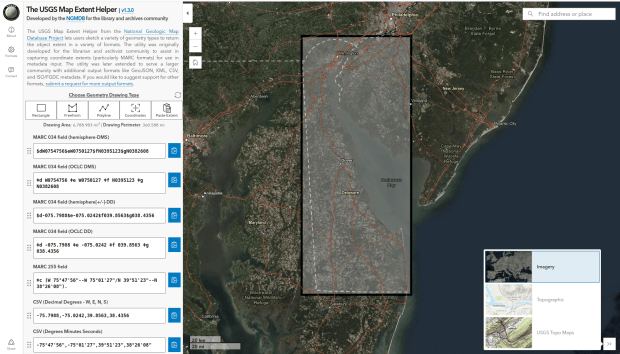
(This tool is also used by folks who already know what the bounding coordinates for a place are, but need to format them in one of the particular standards).
BoundingBox Tool
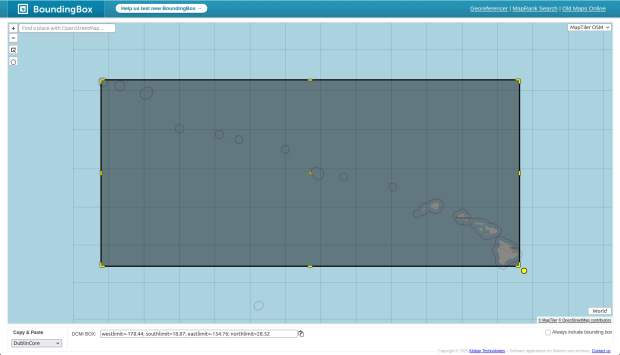
This browser-based tool was created by Klokan Technologies, a Swiss company that provides geospatial services and web map publishing based on open source tools. This tool is free to use, and is built on the OpenStreetMap’s services. While you can draw your own box, it also let’s you do a place-based search against the OSM database, so you can generate coordinates for known-places without having to draw anything (which gives you a consistent set of coordinates each time). You do have the option to adjust the resulting box based on your needs. For example, the bounding box for Hawaii encompasses a huge area beyond the main islands. If you were describing a dataset that pertains to Hawaiian census data or the built environment, a smaller box for the main islands might be preferable. Like the USGS tool, you can output the results to many of the same metadata or geospatial file formats, and there are a few different basemap options.
QGIS
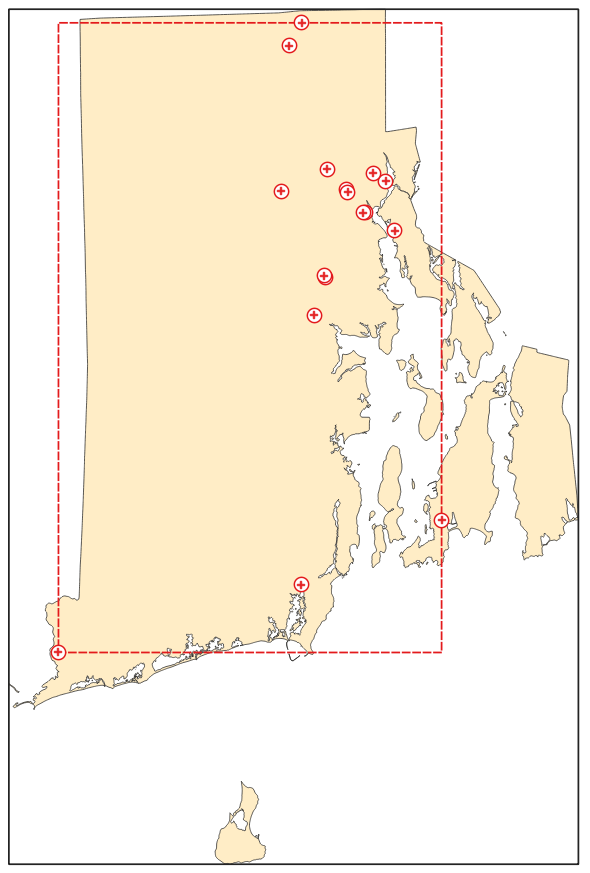
There’s a long-standing debate in the metadata community around what constitutes “proper” bounding box metadata for GIS data. If I have a feature set for all the hospitals in Rhode Island, I could simply generate bounding coordinates for the state and apply those to my metadata record, the implication being that this dataset captures all hospitals in the state. On the other hand, you could argue that it would be more accurate to draw a bounding box around the actual set of hospitals, as that more accurately captures the areal extent of those features. The box would be smaller, as the extent of the hospitals is not as great as the extent of the state.
In a desktop GIS package like ArcGIS Pro or QGIS, you can right click on a layer, go to its properties, and look up the spatial extent of the features; in QGIS this appears in the Information tab. A potential problem is the coordinates are displayed in the CRS of the layer; if your layer is using a projected coordinate system in meters or feet, it’s hard to interpret what the coverage is, and it’s usually not appropriate for metadata (where coordinates are generally represented in longitude and latitude).
You can generate a new layer with bounding box geometry instead, and transform it. I’ve often used this approach when I need a MBR file for data extraction. For example, I always upload a GeoJSON MBR to specify the area for daily scenes that I want to extract from our Planet Labs satellite imagery account.
In QGIS, go to Vector – Research Tools – Extract Layer Extent (alternatively, in the Processing menu under Vector geometry tools, there is a Minimum bounding geometry tool that provides additional options). Select an input file, and run the tool to create a temporary layer. Next, right-click, export, and save the result as a GeoJSON file, and in doing so change the CRS to WGS 84. Go back and look up the coordinates in the properties menu, or you can open the GeoJSON is a text editor.
Python
The GeoPandas module in Python provides some quick functions for getting bounding coordinates for GIS features. Load your dataset into a geodataframe, and run the following to determine the CRS for the geometry and what the bounding coordinates are for the layer (see this GitHub tutorial for the basics):
gdf_yourdata.crsgdf_yourdata.total_bounds
If the layer’s CRS is not in longitude and latitude, you can convert it to WGS 84, and then get the bounds.
gdf_yourdata.to_crs(4326,inplace=True)
If you want to generate actual bounding box geometry in a new geodataframe, you can do something like this, where you slice the bounding coordinates list and use it to construct each of the coordinate pairs. When you’re finished, you can write the geodataframe out to any GIS file format.
corners=gdf_yourdata.total_boundsminx=corners[0]miny=corners[1]maxx=corners[2]maxy=corners[3]areabbox = gpd.GeoDataFrame({'geometry':Polygon([(minx,maxy), (maxx,maxy), (maxx,miny), (minx,miny), (minx,maxy)])},index=[0],crs="EPSG:4326")
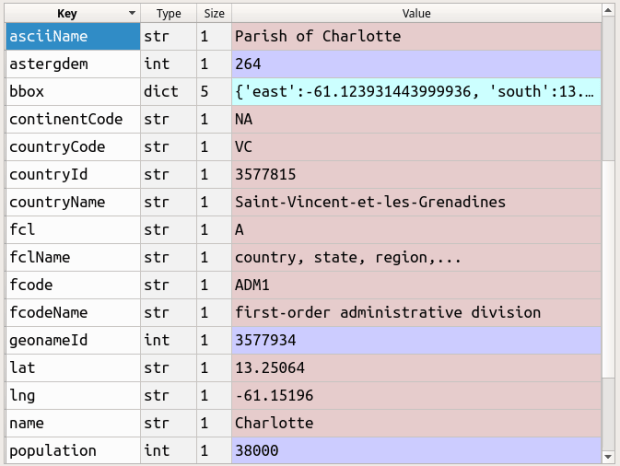
These examples presume that you have a GIS data file, and you want to calculate the MBR for it. If you want to programmatically return a bounding box for a named feature… while it wasn’t my intent at the time, I actually did this several years ago in this post about the Geonames API. The Search API has a parameter that allows you to fetch a bounding box (bbox) for any features that you return.


You must be logged in to post a comment.