
events

News or review of an event, like a conference or workshop

USAID DHS No Data Available

Rescuing US Government Data

There’s been a lot of turmoil emanating from Washington DC lately. One development that’s been more under the radar than others has been the modification or removal of US federal government datasets from the internet (for some news, see these articles in the New Yorker, Salon, Forbes, and CEN). In some cases, this is the intentional scrubbing or deletion of datasets that focus on topics the current administration doesn’t particularly like, such as climate and public health. In other cases, the dismemberment of agencies and bureaus makes data unavailable, as there’s no one left to maintain or administer it. While most government data is still available via functioning portals, most of the faculty and researchers I work with can identify at least a few series they rely on that have disappeared.

Librarians, archivists, researchers, professors, and non-profits across the country (and even in other parts of the world), have established rescue projects, where they are actively downloading and saving data in repositories. I’ve been participating in these efforts since January, and will outline some of the initiatives in this post.

The Internet Archive

The place of last resort for finding deleted web content is the Internet Archive. This large, non-profit project has been around as long as the web has existed, with the goal of creating a historic archive of the internet. It uses web crawlers or spiders to creep across the web and make copies of websites. With the Wayback Machine, you can enter a URL and find previous copies of web pages, including sites that no longer exist. You’re presented with a calendar page where you can scroll by year and month to select a date when a page was captured, which opens up a copy.
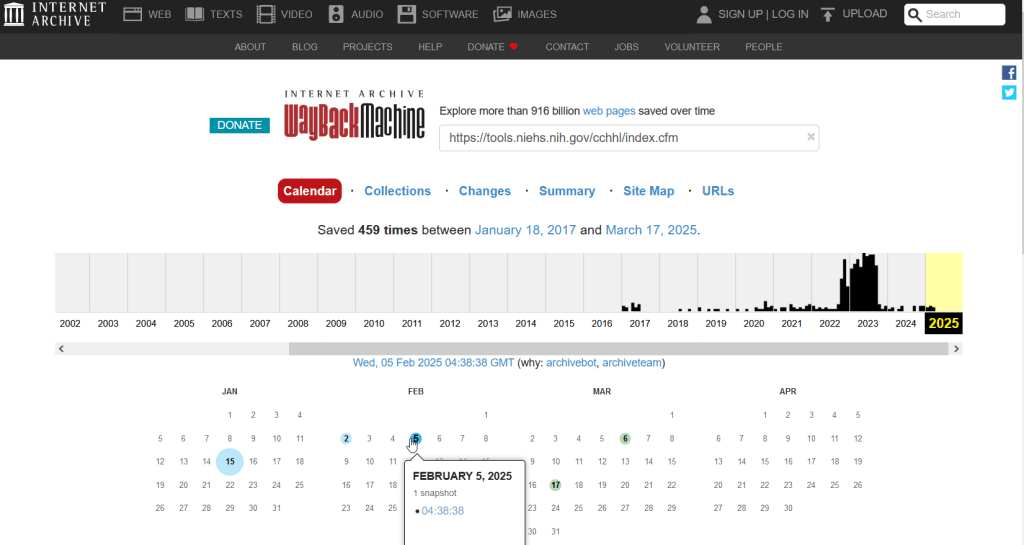
A Wayback Machine search for https://tools.niehs.nih.gov/cchhl/index.cfm. Blue circles on the calendar indicate when the page was captured.

This allows you to see the content, navigate through the old website, and in many cases download files that were stored on those pages. It’s a great resource, but it can’t capture everything; given the variety and complexity of web pages and evolving web technologies, some websites can’t be saved in working order (either partially or entirely). Content that was generated and presented dynamically with JavaScript, or was pulled and presented from a database, is often not preserved, as are restricted pages that required log-ins.
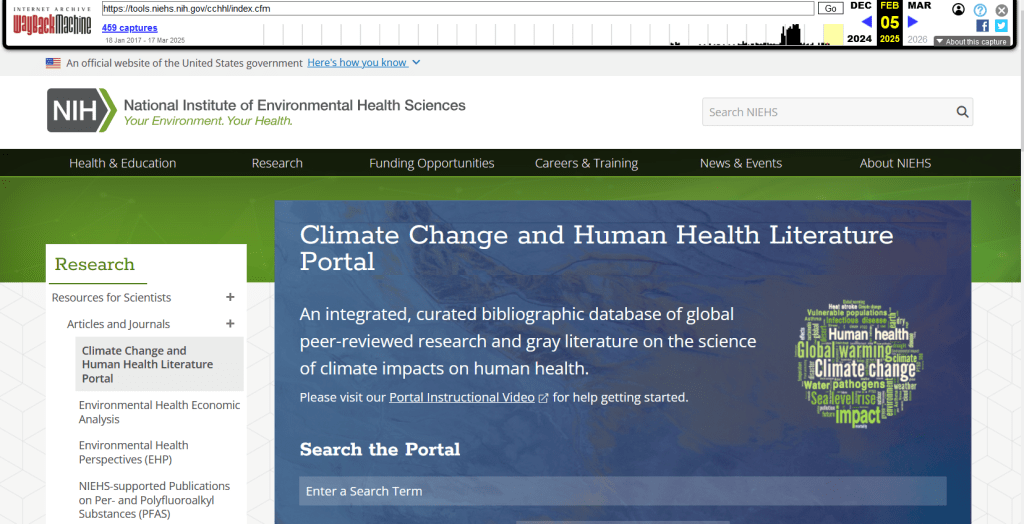
An archived copy of the NIEHS page (the actual website was deleted in mid February 2025)

The Internet Archive also hosts a number of special collections where folks have saved documents, images, sound and video, and software. For example, you can find many research articles that are available in PubMed from the PubMed Central collection, a ton of documents from the USDA’s National Agricultural Library, and about 100 GB of data someone captured from the CDC in January 2025. A large project called the End of Term Archive was launched in 2008 to capture what federal government websites looked like at the end of each presidential term. The pages are saved in a special collection in the IA.

Data Rescue Project

Dozens of new data archiving projects were launched at the end of 2024 and beginning of 2025 with the intention of saving federal datasets. The Data Rescue Project is one of the larger efforts, which has been driven by data librarians and archivists with non-profit partners. Professional groups including IASSIST, ICPSR, RDAP, the Data Curation Network, and the Safeguarding Research & Culture project have been active organizers and participators. While this will be an oversimplification, I’ll summarize the project as having two goals

The first goal is to keep track of what the other archiving projects are, and what they have saved. To this end, they created the Data Rescue Tracker, which has two modules. The Downloads List is an archive of datasets that have been saved, with details about where the data came from and locations of archived copies. The Maintainers List is a catalog of all the different preservation projects, with links to their home pages. There is also a narrative page with a comprehensive list of links to the various rescue efforts, data repositories, alternate sources for government data, and tools and resources you can use to save and archive data.
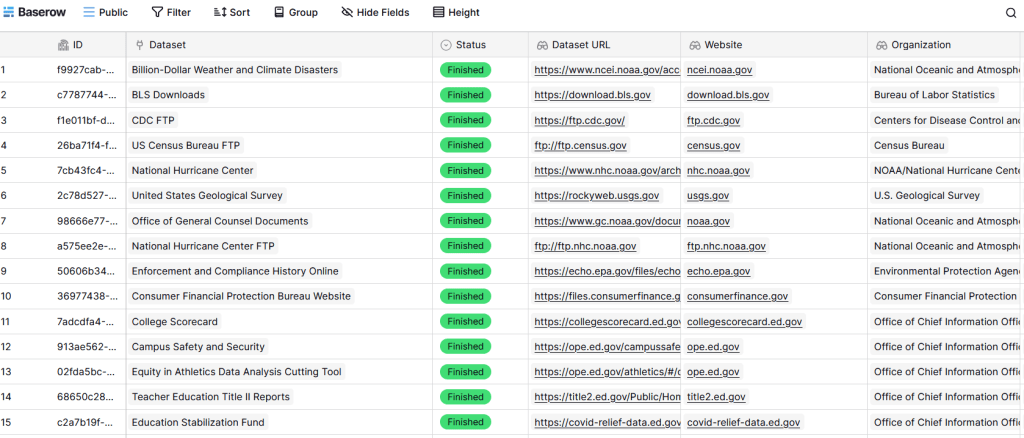
The Data Rescue Tracker Downloads List

The second goal is to contribute to the effort of saving and archiving data. The team maintains an online spreadsheet with tabs for agencies that contain lists of datasets and URLs that are currently prioritized for saving. Volunteers sign up for a dataset, and then go out and get it. Some folks are manually downloading and saving files (pointing and clicking), while others write short screen scraping scripts to automate the process. The Data Rescue Project has partnered with ICPSR, a preeminent social science research center and repository in the US, at the University of Michigan. They created a repository called DataLumos, which was launched specifically for hosting extracts of US federal government data. Once data is captured, volunteers organize it and generate metadata records prior to submitting it to DataLumos (provided that the datasets are not too big).
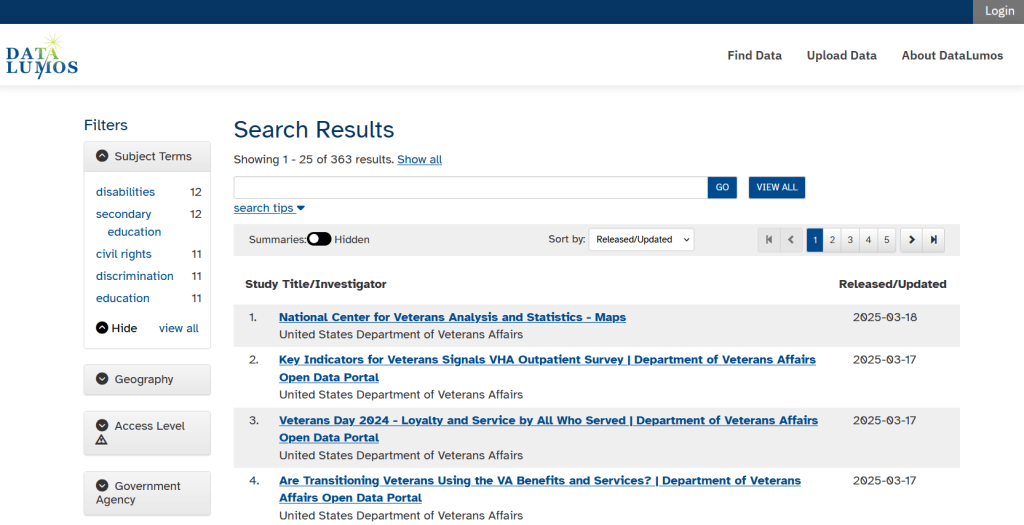
DataLumos archive for federal government datasets, maintained by ICPSR

Most of the datasets that DRP is focused on are related to the social sciences and public policy. The Data Rescue Project coordinates with the Environmental and Government Data Initiative and the Public Environmental Data Partners (which I believe are driven by non-profit and academic partners), who are saving data related to the environment and health. They have their own workflows and internal tracking spreadsheets, and are archiving datasets in various places depending on how large they are. Data may be submitted to the Internet Archive, the Harvard Dataverse, GitHub, SciOp, and Zenodo (you can find out where in the Data Rescue Tracker Download’s List).

Mega Projects

There are different approaches for tackling these data preservation efforts. For the Data Rescue Project and related efforts, it’s like attacking the problem with millions of ants. Individual people are coordinating with one another in thousands of manual and semi-automated download efforts. A different approach would be to attack the problem with a small herd of elephants, who can employ larger resources and an automated approach.

For example, the Harvard Law School Library Innovation Lab launched the Archive of data.gov, a large project to crawl and download everything that’s in data.gov, the US federal government’s centralized data repository. It mirrors all the data files stored there and is updated regularly. The benefit of this approach is that it captures a comprehensive amount of data in one go, and can be readily updated. The primary limitation is that there are many cases where a dataset is not actually stored in data.gov, but is referenced in a catalog record with a link that goes out to a specific agency’s website. These datasets are not captured with this approach.

If trying to find back-ups is a bit bewildering, there’s a tool that can help. Boston University’s School of Public Health and Center for Health Data Science have created a find lost* data search engine, which crawls across the Harvard Project, DataLumos, the Data Rescue Project, and others.

Beyond the immediate data preservation projects that have sprung up recently, there are a number of large, on-going projects that serve as repositories for current and historical datasets. Some, like IPUMS at the University of Minnesota and the Election Lab at MIT focus on specific datasets (census data for the former, election results data for the latter). There are also more heterogeneous repositories like ICPSR (including OpenICPSR which doesn’t require a subscription), and university-based repositories like the Harvard Dataverse (which includes some special collections of federal data extracts, like CAFE). There are also private-sector partners that have an equal stake in preserving and providing access to government data, including PolicyMap and the Social Explorer.

Wrap-up

I’ve been practicing my Python screen scraping skills these past few months, and will share some tips in a subsequent post. I’ve been busy contributing data to these projects and coordinating a response on my campus. We’ve created a short list of data archives and alternative sources, which captures many of the sources I’ve mentioned here plus a few others. My library colleagues in the health and medical sciences have created a list of alternatives to government medical databases including PubMed and ClinicalTrials.gov

Having access to a public and robust federal statistical system is a non-partisan issue that we should all be concerned about. Our Constitution justifies (in several sections) that we should have such a system, and we have a large body of federal laws that require it. Like many other public goods, the federal statistical system contributes to providing a solid foundation on which our society and economy rest, and helps drive innovation in business, policy, science, and medicine. It’s up to us to protect and preserve it.


Census Workshop Recap

I’ve been swamped these past few months, revising my census book, teaching a spatial database course, and keeping the GIS Lab running. Thus, this will be a shorter post!

Last week I taught a workshop on understanding, finding, and accessing US Census Data at the Metropolitan Library Council of New York. If you couldn’t make it, here are the presentation slides and the group exercise questions.

Most of the participants were librarians who were interested in learning how to help patrons find and understand census data, but there were also some data analysts in the crowd. We began with an overview of how the census is structured by dataset, geography, and subject categories. I always cover the differences between the decennial census and the ACS, with a focus on how to interpret ACS estimates and gauge their reliability.

For workshops I think it’s best to start with searching for profiles (lots of different data for one place). This gives new users a good overview of the breadth and depth of the types of variables that are available in the census. Since this was a New York City-centric crowd we looked at the City’s excellent NYC Population Factfinder first. The participants formed small groups and searched through the application to answer a series of fact-finding questions that I typically receive. Beyond familiarizing themselves with the applications and data, the exercises also helped to spark additional questions about how the census is structured and organized.

Then we switched over to the Missouri Census Data Center’s profile and trends applications (listed on the right hand side of their homepage) to look up data for other parts of the country, and in doing so we were able to discuss the different census geographies that are available for different places. Everyone appreciated the simple and easy to use interface and the accessible tables and graphics. The MCDC doesn’t have a map-based search, so I did a brief demo of TIGERweb for viewing census geography across the country.

Once everyone had this basic exposure, we hopped into the American Factfinder to search for comparison tables (a few pieces of data for many places). We discussed how census data is structured in tables and what the difference between the profile, summary, and detailed tables are. We used the advanced search and I introduced my tried and true method of filtering by dataset, geography, and topic to find what we need. I mentioned the Census Reporter as good place to go for ACS documentation, and as an alternate source of data. Part of my theme was that there are many tools that are suitable for different needs and skill levels, and you can pick your favorite or determine what’s suitable for a particular purpose.

We took a follow-the-leader approach for the AFF, where I stepped through the website and the process for downloading two tables and importing them into a spreadsheet, high-lighting gotchas along the way. We did some basic formulas for aggregating ACS estimates to create new margins of error, and a VLOOKUP for tying data from two tables together.

We wrapped up the morning with a foreshadowing of what’s to come with the new data.census.gov (which will replace the AFF) and the 2020 census. While there’s still much uncertainty around the citizenship question and fears of an under count, the structure of the dataset won’t be too different from 2010 and the timeline for release should be similar.

foss4g boston 2017 logo

FOSS4G 2017 Round Up

A month ago at this time I was in Boston for FOSS4G 2017 (Free and Open Source for Geospatial), which is the international conference for free and open source GIS enthusiasts, developers, educators, and practitioners. I updated my introductory GIS / QGIS workshop manual to 2.18 Las Palmas (which is slated to be the next long term service release once 3.0 comes out) and Anastasia, Janine, and I took the workshop on the road. We had a good turnout and an excellent class, and then were able to enjoy the three days of sessions. Here are some of the high-lights from sessions I attended.

  • The NYC Department of City Planning has hired their own, internal open source developer and is assembling a team called NYC Planing Labs. Their first project was to revamp the city facilities database and build the NYC Facilities Explorer, a web mapping interface that sits on top of the database and makes it easy for folks to browse and visualize.
  • There was an interesting talk from an independent research unit that’s affiliated with the University of Chicago. The speaker outlined their process for switching their team from ESRI to open source. The talk gave me appreciation for the amount of work that’s involved for transitioning a team of service providers from one set of tools to another. This group did things the right way, doing necessary background research and identifying short, medium, and long term plans for making the switch. Their biggest revelation was that they ended up shifting funds from purchasing licenses to staff, which has allowed them to expand their activities.
  • PostGIS 2.4 will add a number of functions that were only available for the geometry type, like ST_Centroid, to the geography type. PostgreSQL 10 is going to allow users with big databases to take greater advantage of parallel computing.
  • Some archaeologists are looking to adapt the schema used by Open Street Map to create an OpenHistoryMap. There aren’t many global standards for cataloging archaeological data; it’s primarily site and project specific. Unique challenges include the importance of scale (need to see that pot shard in a room, in a house, in the overall site, in the greater region…) and varying degrees of reliability. Once an artifact is found there isn’t absolute certainty regarding it’s age, provenance, or use. This project (Open History Map) is different from Open Historical Map; the latter relies on data that’s already in OSM and describes the past as a function of the present.
  • I tend to use GRASS GIS in limited circumstances, but am always pleasantly surprised when I follow up to see what’s new. The big selling points are stability, backwards compatibility, and the ability to do a lot via the command line. For version 7.2 there are several improvements: an improved GUI, a data catalog, a more sophisticated Python editor, easier vector legend tools, an advanced search feature for finding modules, and temporal algebra. I’m not a heavy raster user and never work in 3D, but these have always been and continue to be major strengths of GRASS. They also have a growing repository of 3rd party plugins and modules.
  • One of the plenary speakers gave us a demo of R markdown for creating websites, documents, and even for writing books. It gives you the ability to easily import data and write R code to produce a chart, graph, or map right in the same document as your narrative text. So instead of doing a basic analysis, creating a chart, and writing up your project in three different places you can do it all in one place and compile it to HTML or PDF. With the source, readers also have the benefit of seeing what you did and they can test the results.
  • R has really come a long way for geospatial analysis and visualization. I can’t remember it even being mentioned at the last FOSS4G I attended in 2011, but in 2017 it was a major component of the conference. In trying to figure how it fits in to the landscape, I assumed that it was a matter of background and preference. People who have a stats background and want to do geospatial work are going to gravitate towards it, while people with more of a programming or data processing background may be more disposed to using Python or Javascript. The plenary speaker framed R as an exploratory language that’s great for iterative work – let me quickly graph this data to see what it looks like, then I’ll write another piece to view it a different way. Other scripting languages tend to tackle more tasks in one large batch in a linear fashion.
  • The contingent of academic GIS and geospatial librarians and developers has been growing at this conference over the years. There was an opportunity for the Open Geoportal and Geoblacklight communities to get together and exchange notes. Both groups have a commitment to open metadata standards and resource sharing.
  • OSGeo folks have been active in promoting free and open source GIS education, and have created a directory of GIS labs around the world.
  • Just when you thought you were confused about which tool to use, here’s another one – Vega, a declarative JSON grammar for creating graphs and charts.
  • QGIS 3.0 is on the horizon; it will encompass a shift from Qt 4 to 5 and Python 2 to 3. There are a number of great new features: a task manager, a data source manager to replace the dozen individual buttons in 2.x, better support for metadata viewing and editing, more 3D tools, multiple map canvases, the ability to store different user profiles (to save your plugins and layouts on shared machines), better digitizing tools, and a whole lot more. A lot of plugins will disappear as they make their way into the processing toolbox, the stand-alone QGIS Browser will be dropped as its functions are integrated into QGIS Desktop, and map projects created in 3.x will not be backward compatible to 2.x. The time line says that 3.0 will be launched in late Nov 2017, and at that point 2.18 will become the LTS release. It will take another year, til Nov 2018, when 3.2 becomes the LTS. If you’re like me and favor stability over new features, you can stick with 2.x for the another year.
  • A good talk on community health mapping introduced a stack that you can use for data gathering (Fulcrum), analysis (QGIS) and publishing on the web (Carto). I’m well versed in the last two, but didn’t know about Fulcrum. Essentially it’s an app that you can use on phones and tablets to gather data out in the field, including GPS coordinates. On his blog he’s created a series of lab exercises that cover the entire stack, so the communities can learn the process and take ownership of it and the tools.

Planning for FOSS4G 2018 is well underway. The conference uses a three year rotation where it goes from Europe to North America to another continent. Next year it’s Africa’s turn as the conference heads to Dar es Salaam in Tanzania.